 Wavelens
Companion radios
Skip the build
Spotter $64 · Full Spectrum $499 — each programmed, set up for the area you give at checkout, tested before it ships, updates free for life. Everything below is how to make one yourself, and it stays free whether you buy or not; this is how to have one by Friday.
Buy one ready to go Or build it: start here
Open firmware and bridge on GitHub · every command below is copied from a Pi we run · receive only
Why a second radio
A phone can't choose which Wi-Fi channel it listens on, can't hear 433/915 MHz or 5.8 GHz at all, and has an antenna the size of a paperclip pointed wherever the phone happens to be. A companion fixes all three. It does the listening with a directional antenna on the roof, and hands every hit to Wavelens, which treats it exactly like its own packets: same signatures, same alerts, same history, map, tails and Rule hits. The app can also tell the companion where to listen — park on channels 1, 6 and 11, or sit on the one 5 GHz channel a body-cam hotspot uses — which is the one thing a phone radio cannot do.
Privacy does not change. The link is Bluetooth only, the app still has no network permission, and the companion never needs one either.
How it connects
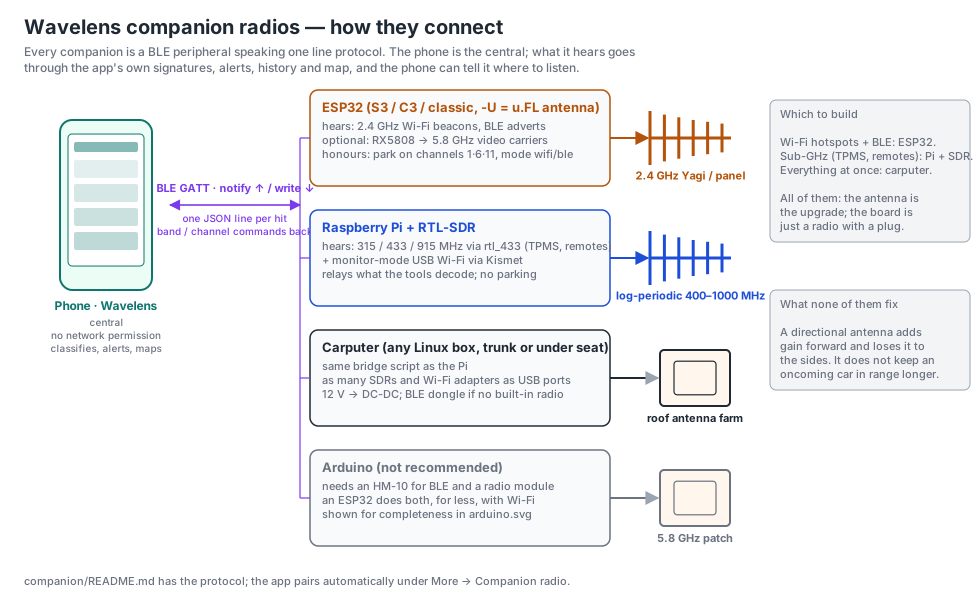
| Build | Hears | Parks on a channel? | Build it | Ready to go |
|---|---|---|---|---|
| ESP32 (-U board with u.FL) | 2.4 GHz Wi-Fi hotspots and BLE adverts · optional 5.8 GHz video carriers (RX5808) · optional 433/315 MHz decoders (CC1101 / SX1276) | Yes | $10–30 | Spotter, $64 |
| Raspberry Pi + RTL-SDR | Hundreds of sub-GHz decoders via rtl_433 (TPMS, key fobs, sensors) · band sweeps below 1.7 GHz · ADS-B aircraft · monitor-mode Wi-Fi via Kismet | No | $60–120 | Full Spectrum, $499 |
| Pi or carputer + HackRF | The whole 1 MHz–6 GHz range about once a second, every carrier labelled by band: video and drone links, low aircraft, military and civil air, toll readers, phones and satellite phones, 4.9 GHz public-safety links, GPS jamming | No | +$300 | Build only; plugs into the Full Spectrum Pi |
| Carputer | All of the above, as many radios as it has USB ports | No | Varies | — |
| Arduino | Only with a BLE module and a radio module; an ESP32 does both for less | — | Not recommended | — |
Buy one ready to go
Every companion can be built from the guides below. Buying one ready saves the setup and gets it right for where you drive. Each box below has its own order button; to put several things in one order (a kit, an extra Spotter and their cases, say) use the cart.
- Works out of the box. Flashed with the current firmware or bridge and tested before it ships. Plug it in, tap Find and Pair, done.
- Set up for your area. At checkout you tell us the city, state or province and country you'll use it in. We load the right local pack before it ships: local band names, the tyre-sensor and remote frequencies used there, and km/h or mph.
- No tools to install. No Python, PlatformIO, USB drivers or SD-card imaging. The Pi arrives with the bridge, the digital-voice decoder and start-on-boot already installed, which is the longest part of a home build.
- Tested together. In the full kit the Pi, both RTL-SDRs and the ESP32 have their jobs assigned and are checked working with each other before they're boxed.
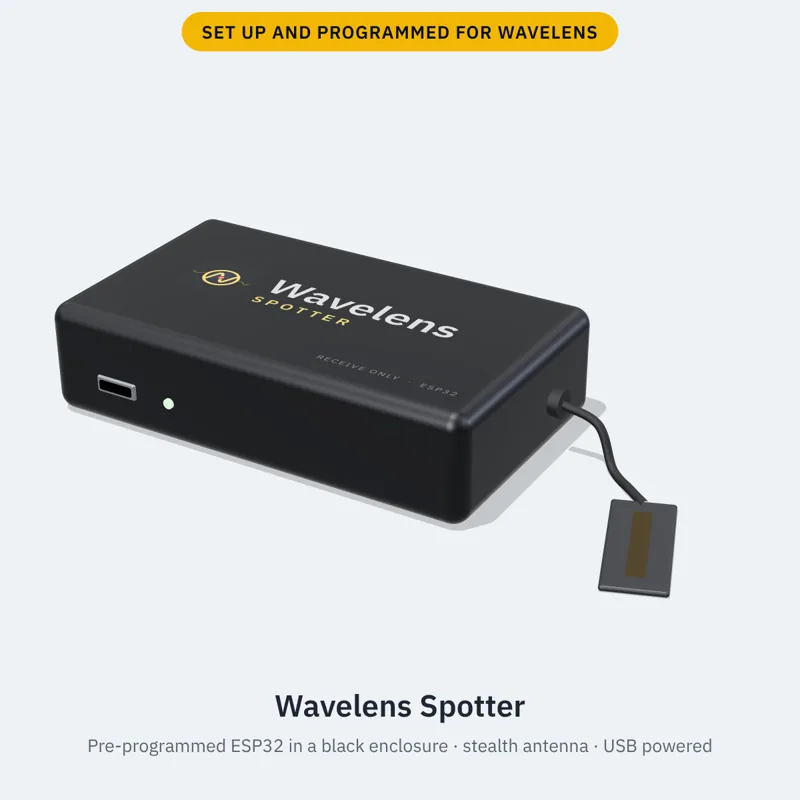
Spotter: pre-programmed ESP32 companion — $64, cased, shipped free in the US. An ESP32-C5 board flashed with the Wavelens firmware and tested before it ships. The C5 is dual-band: it hears Wi-Fi on both 2.4 and 5 GHz (where some newer body-cam docks sit) as well as Bluetooth LE. The C5 build is new, so tell us how yours does. It comes in a black enclosure with the Wavelens logo on the lid and a status light, with a low-profile stealth antenna on a short lead. Plug it into any USB port in the car, tap Find and Pair in Wavelens, and it's listening: no computer, no flashing.
Works on its own. A Spotter needs no Raspberry Pi. It pairs straight to your phone over Bluetooth and runs from any USB power: a car charger, a power bank, a spare port. The Pi in Full Spectrum is only there for the sub-GHz radios (tyre sensors, remotes, public-safety bands); Wi-Fi and Bluetooth at range is all Spotter.
Already have Full Spectrum? Spotters can also plug into its Pi. A Spotter plugged into one of the Pi's USB ports needs no pairing: the Pi drives it over the cable and passes what it hears to your phone over its one Bluetooth link. Two split the work, one on Bluetooth and one on the busy Wi-Fi channels, so neither misses what the other is listening to. Or keep one paired with the phone and plug one into the Pi: the Pi's parks on the busy Wi-Fi channels so a camera you drive past is heard within a beacon or two, and the phone's keeps listening to every channel and Bluetooth. You can change each one's job on the phone or the Pi's admin page.
iPhone and iPad. iOS doesn’t let apps scan Wi-Fi and hides Bluetooth addresses, so the free Wavelens iOS app (beta) does its listening through a Spotter. This one, or any ESP32 you flash with the free firmware. You can lock it to your phones with a 6-digit passkey from the iOS app. Join the iOS beta.
Antenna mod. The board is fitted for an external antenna instead of the tiny one printed on the circuit board, so it hears Wi-Fi and Bluetooth from further out than a phone sitting in your pocket, where your body and the car soak up the signal.
Order (US) Order (outside the US, $89) No thanks, I'll program my own
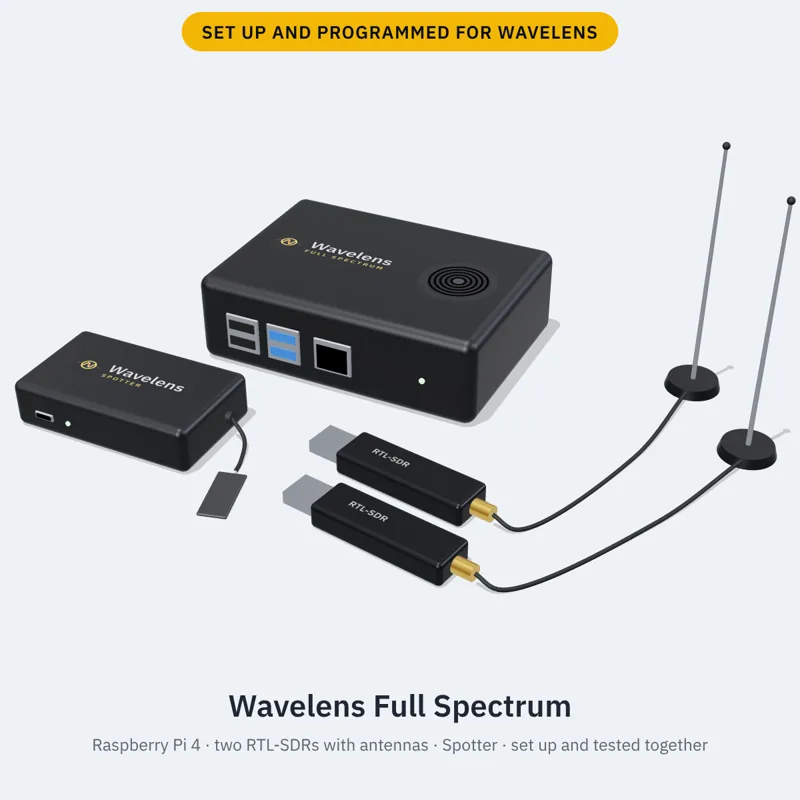
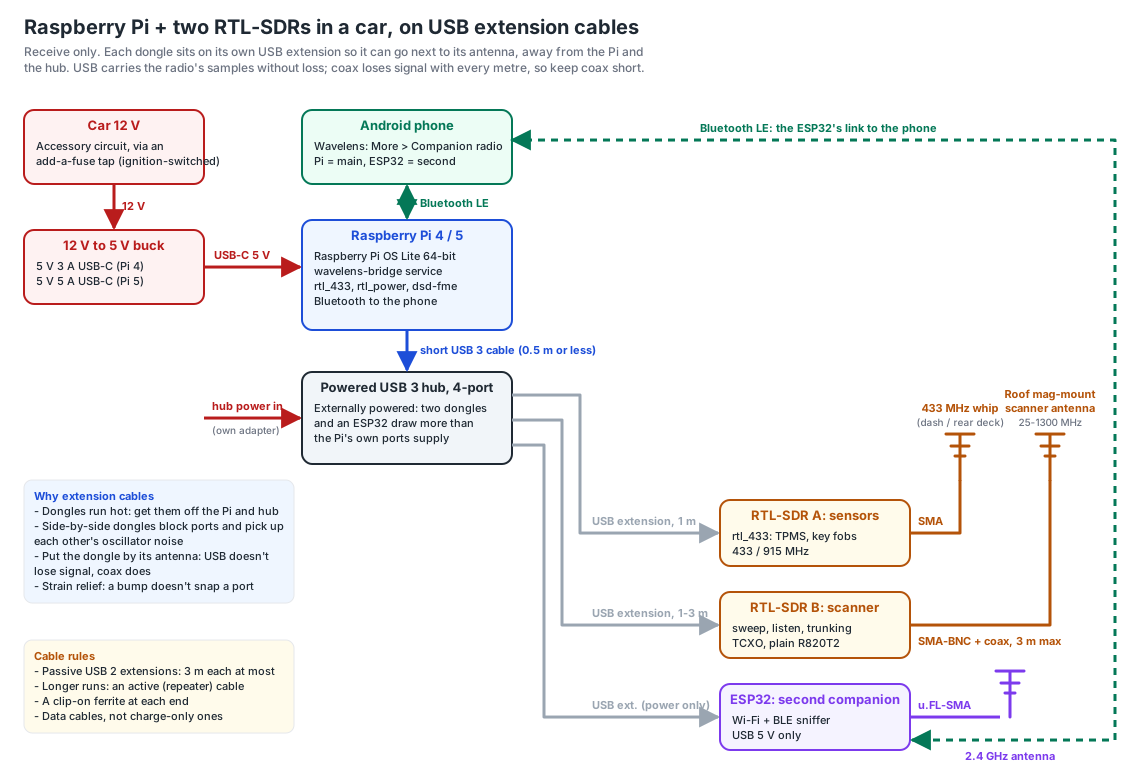
Full Spectrum: the full kit — $499. Everything for the car, set up and tested together: a pre-programmed Raspberry Pi 4 (4 GB) with the Wavelens bridge, two RTL-SDRs, each with its own antenna (one for tyre sensors and remotes, one for the scanner), two 6-inch USB extension cables so the dongles sit clear of the Pi, and a Spotter (dual-band ESP32-C5) for 2.4 and 5 GHz Wi-Fi and Bluetooth. Pair the Pi as the main companion and the ESP32 as the second, and the phone, the Pi and the ESP32 all listen at once.
Order (US) Order (outside the US, $524) No thanks, I'll build my own
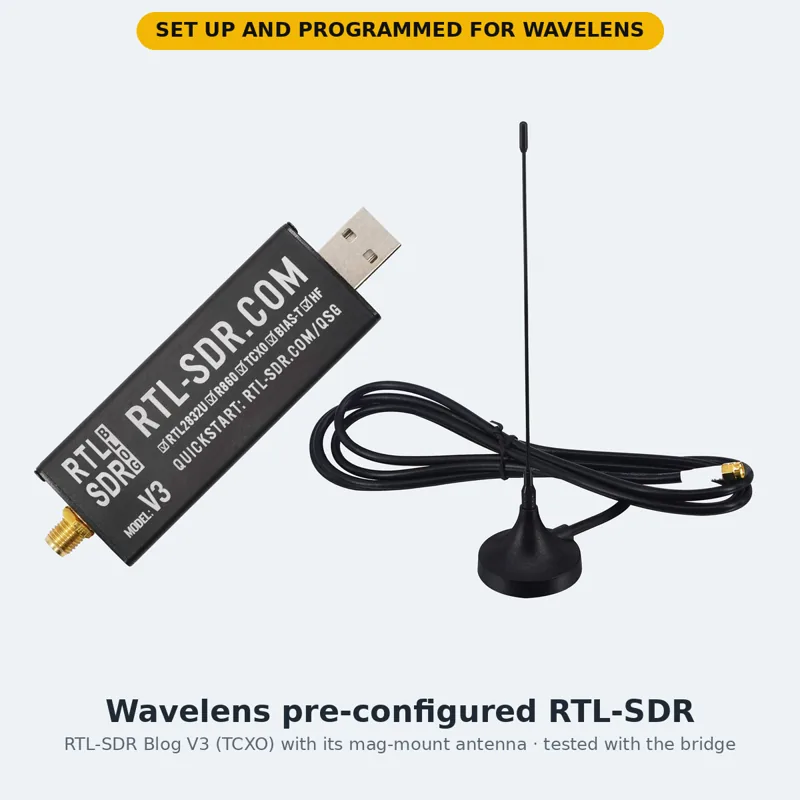
Extra: pre-configured RTL-SDR — $40, antenna included. An RTL-SDR receiver set up and tested with the Wavelens bridge, with the right antenna for its job. Every RTL-SDR we sell comes with an antenna: a mag-mount whip on a 3 m SMA lead (shown), cut for the dongle's job, that sits on the roof, dash or rear deck. Get two. One decodes tyre sensors and remotes while the other runs the scanner, and the bridge uses both at once; with one dongle you pick a job. Checkout defaults to two, and the full kit includes two.
Order (US) Order (outside the US, $65) No thanks, I'll set up my own
Add-ons at checkout
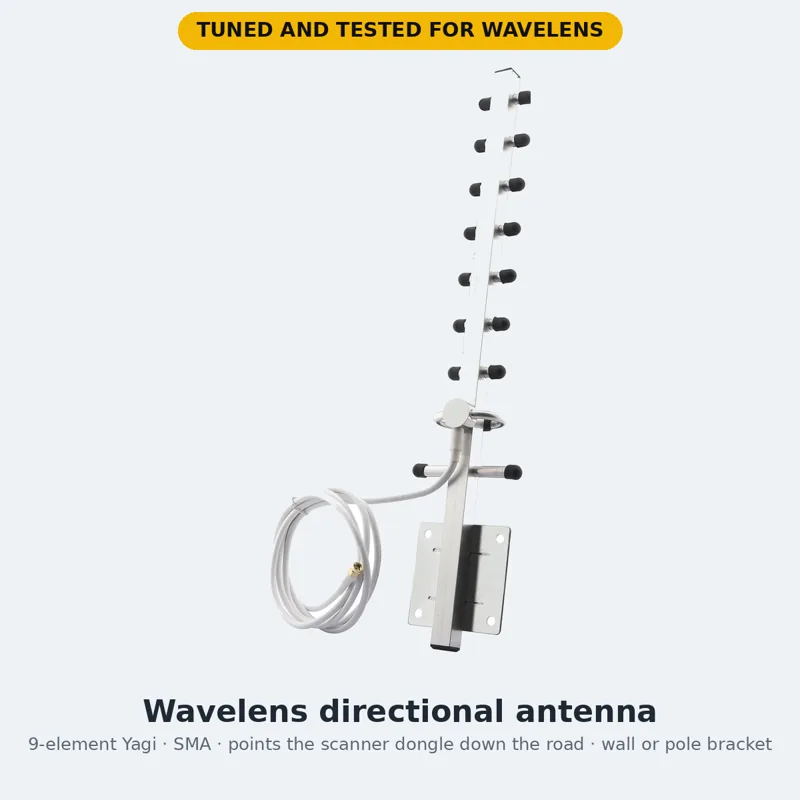
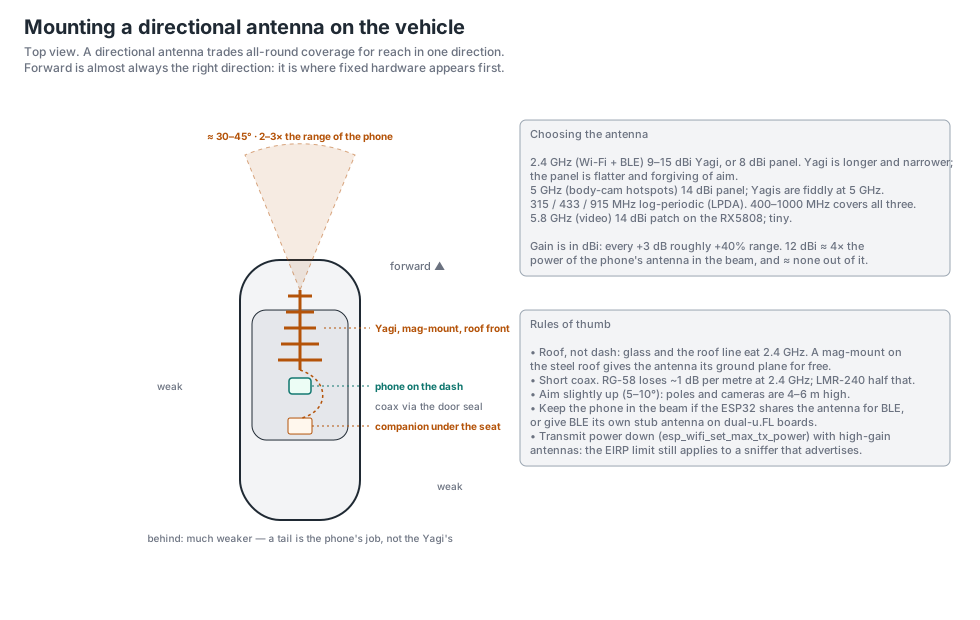
- Directional antenna for the RTL-SDR (Yagi) — $59. Sold out A 9-element Yagi on an SMA lead with a wall or pole bracket. Points the scanner dongle one way and adds gain there, so a fixed plate reader or hotspot is audible blocks sooner, at the cost of hearing less to the sides. For a parked or home install, or a roof mount facing forward. Mounting it.
- Protective cases. Each checkout offers the case for what you're buying: a Raspberry Pi case with heatsinks and a quiet fan for a hot car, $25; a padded sleeve for an RTL-SDR and its antenna, $12. The Spotter already ships in its enclosure. The full kit offers one case set, $99: all of those plus a hard carry case with cut foam for the whole rig.
- Car roof antenna kit — $49. Sold out Two things in the box: a wideband magnetic-mount antenna on a 3 m lead with an SMA plug, and a free tube of silicone sealant for weatherproofing where the lead comes in. The SMA plug goes straight onto an RTL-SDR, a HackRF, or any other receiver with an SMA socket; the Spotter takes it through the u.FL pigtail that ships with it. On the roof, outside the metal, is where any antenna hears furthest.
- Longer USB extension cables — 1 m $8, 2 m $10, 3 m $12. Full Spectrum orders already include two 6-inch cables, one per dongle; these are the long data cables (not charge-only) to put a dongle or the ESP32 next to its antenna and away from the Pi. See the wiring diagram for why.
ESP32 with a directional antenna
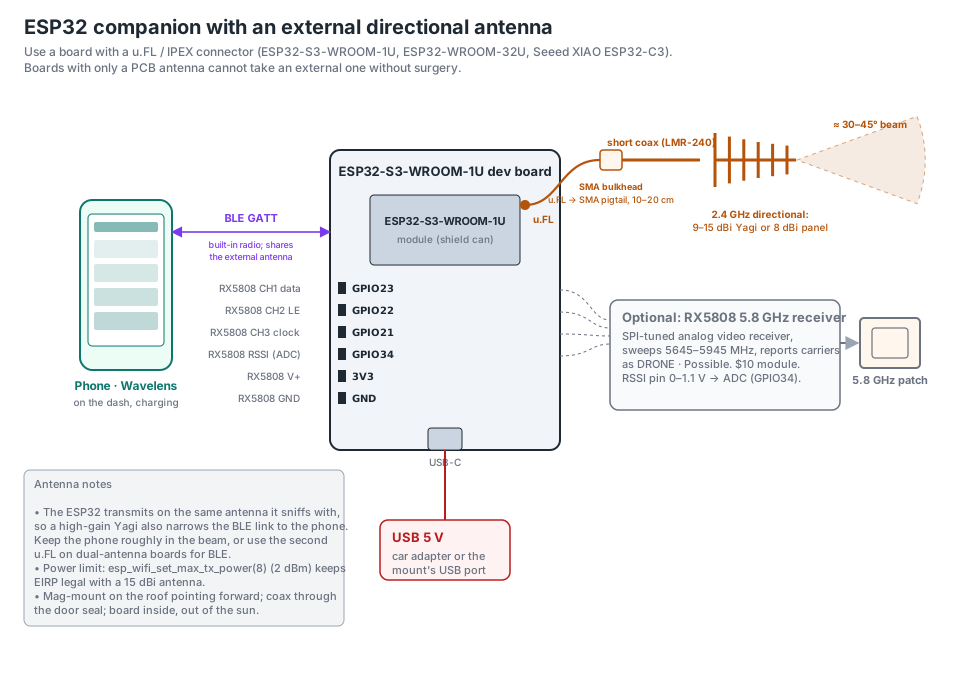
The build most people should make. A $10 board, one sketch, and a 2.4 GHz Yagi or panel on a mag-mount. Rather not flash it? Spotter is this build done for you, $64, cased, with the antenna fitted. Use a board with a u.FL antenna connector (ESP32-S3-WROOM-1U, ESP32-WROOM-32U); boards with only a PCB antenna cannot take an external one.
ESP32 setup, step by step
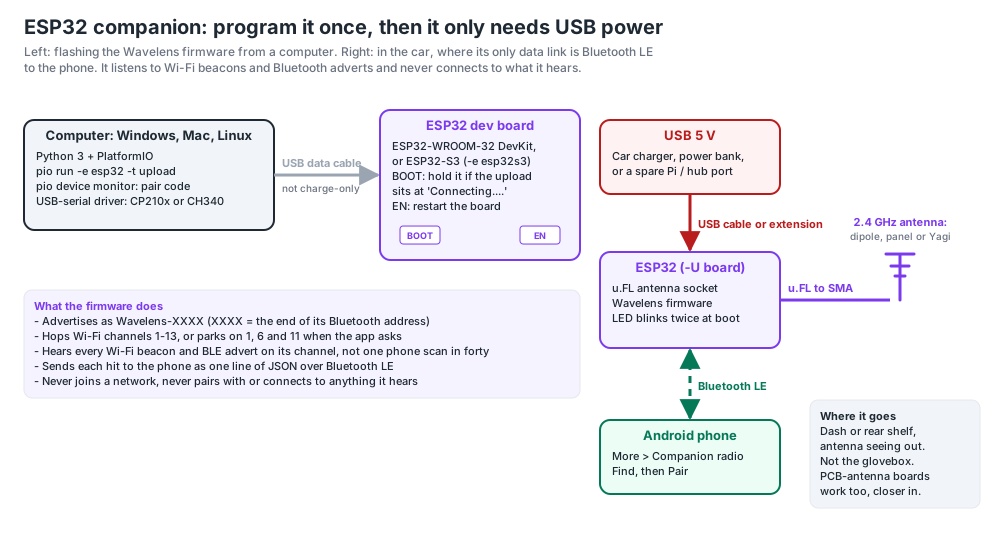
A bare ESP32 dev board — no modules, no soldering — is a Wi-Fi and Bluetooth sniffer that sees every beacon on a channel instead of one phone sweep in forty. Ten minutes from the box to the app. Done on Windows here; Mac and Linux are the same commands.
- What you need
Any ESP32 dev board (a plain ESP32-WROOM-32 "DevKit" is fine; an ESP32-S3 works too) and a USB data cable — many are charge-only and the board never shows up. Boards with a u.FL connector can take an external antenna later; a PCB-antenna board is fine to start.
- Install the build tool
Python 3 from python.org (tick "Add to PATH"), then in PowerShell:
pip install platformio - Get the firmware
git clone --depth 1 https://github.com/pmcbrien/wavelens.git cd wavelens\companion\esp32\wavelens_companion - Plug the board in and flash
pio run -e esp32 -t uploadThe first run downloads the ESP32 toolchain (a few minutes); after that a build is under a minute. It ends with
Hash of data verifiedand[SUCCESS]. For another chip use its environment:-e esp32s3,-e esp32c3,-e esp32c6or-e esp32c5. Easier still: the browser flasher picks the right one for you.If it says
Serial port COM1or No serial data received, it couldn't find the board: open Device Manager and look under Ports (COM & LPT). Nothing there means the USB-serial driver is missing — CP210x (Silicon Labs) or CH340/CH343 (WCH), whichever chip sits next to the USB socket — or the cable is charge-only. Then name the port:pio run -e esp32 -t upload --upload-port COM5. If it sits atConnecting....with the right port, hold the board's BOOT button until it starts writing. - Read its code
pio device monitorIt prints
advertising as 'Wavelens-3F2A' (pair code 3F2A). Ctrl+C to leave; the board keeps running. From now on it only needs 5 V from any USB port — the car, a power bank, the Pi's spare port. - Pair it
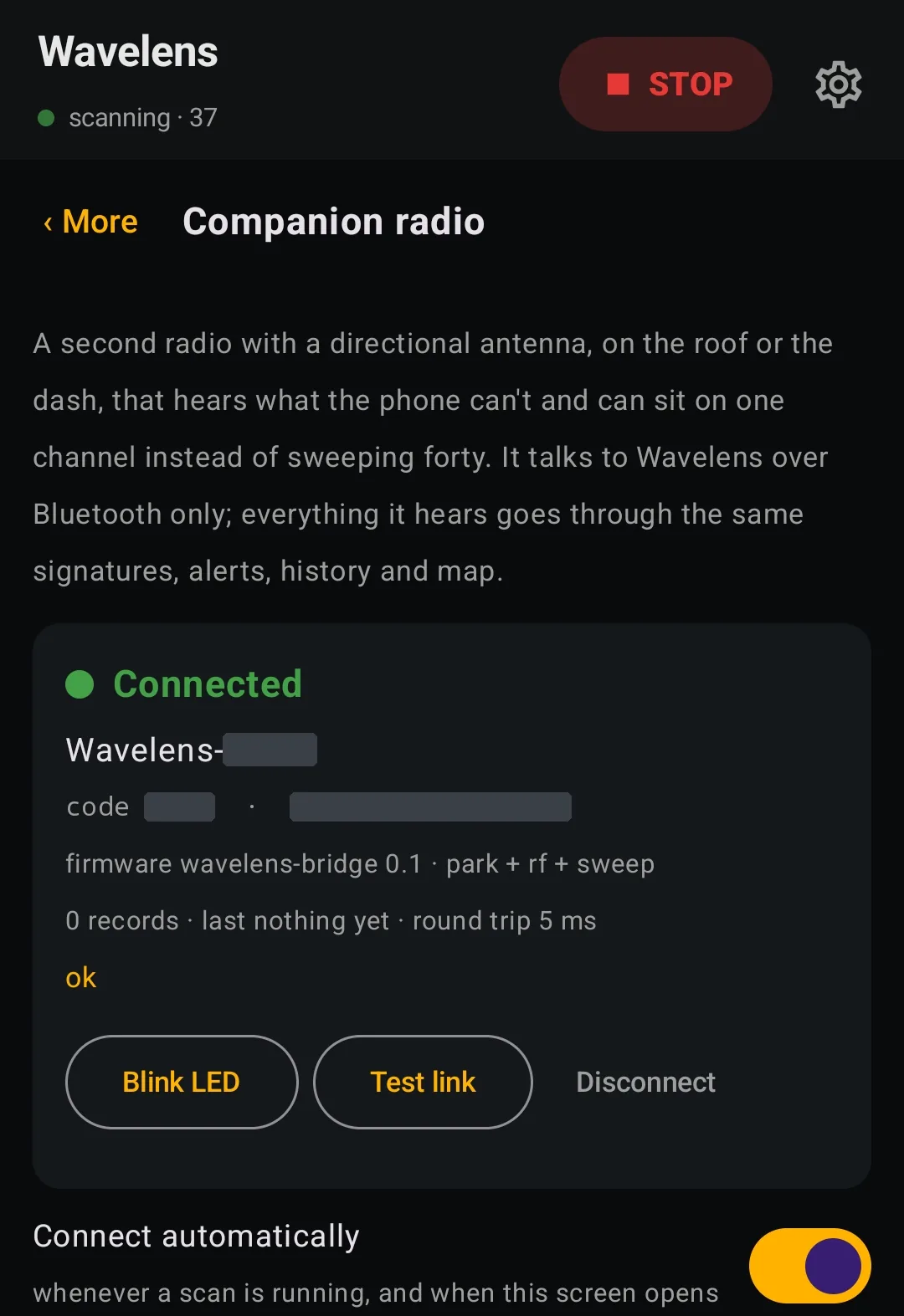
In Wavelens, More → Companion radio. With no companion yet, tap Find and then Pair on the entry with that code. Already running a Raspberry Pi as the main companion? Scroll to Second companion → Find → Pair as second: both stay connected, the Pi keeps the scanner and the ESP32 feeds Wi-Fi and Bluetooth hits into the same list. Blink LED confirms you've got the right board. It reconnects by itself from then on.
- Park it where it counts
Companion radio → Park for body cams & radios pins the ESP32 to Wi-Fi channels 1, 6 and 11, where body-cam and in-car hotspots live, and keeps Bluetooth on. Put the board where its antenna sees out — dash or rear shelf, not the glovebox.
Adding modules later — an SA818 for an analog scanner, an SX1276/CC1101 for sub-GHz sensors and a spectrum strip, an RX5808 for 5.8 GHz video — is a different build environment and a few wires; the platformio.ini lists them, and the blog walks through the SA818.
Rather not flash it? Spotter, $64, is this exact build with the antenna mod done, in a black enclosure, set up for your area and tested. Plug in, Find, Pair.
Raspberry Pi + RTL-SDR
For sub-GHz: tyre-pressure sensors, key fobs, wireless sensors, LoRa — none of which any phone hears. rtl_433 decodes them by name; the bridge script relays them over the Pi's own Bluetooth. A monitor-mode USB Wi-Fi adapter with Kismet adds Wi-Fi on any channel, including 5 GHz hidden-SSID hotspots, with no operating-system throttling.
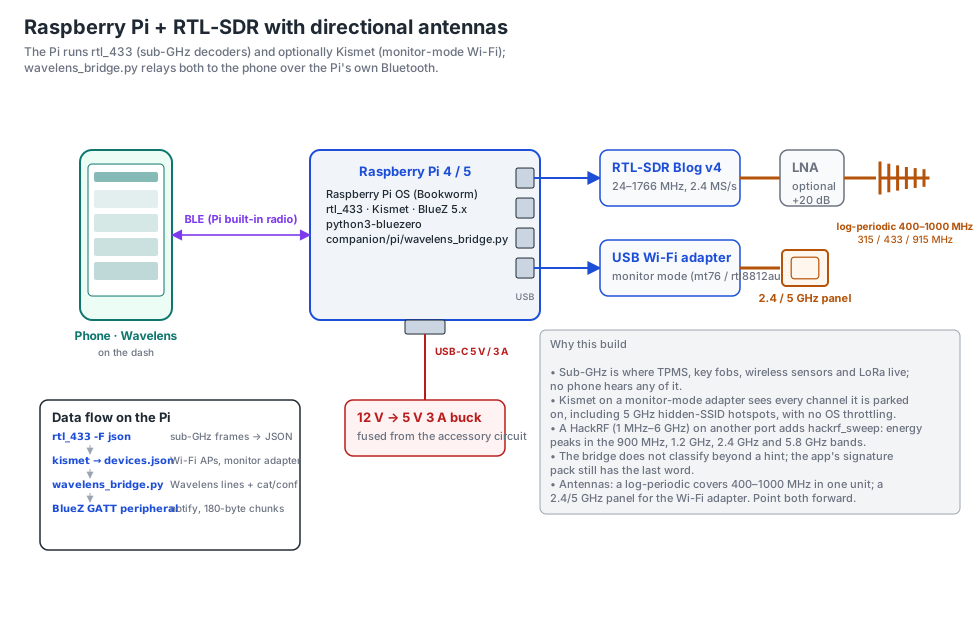
wavelens_bridge.py, which is the BLE peripheral. Add a HackRF on another port for sweeps.Every command to build one is in the step-by-step setup below.
One Pi, three receivers: HackRF + two RTL-SDRs
RTL-SDR A decodes 315 / 433 / 915 MHz by name with rtl_433; RTL-SDR B sweeps below 1.7 GHz with rtl_power; the HackRF sweeps the whole 1 MHz–6 GHz range about once a second and labels every carrier by band — low aircraft (radio altimeters), military and civil air, drone and video links, toll readers, phones and satellite phones, 4.9 GHz public-safety links, GPS jamming. Put all three on a powered USB hub: a Pi 4 can't power them on its own.
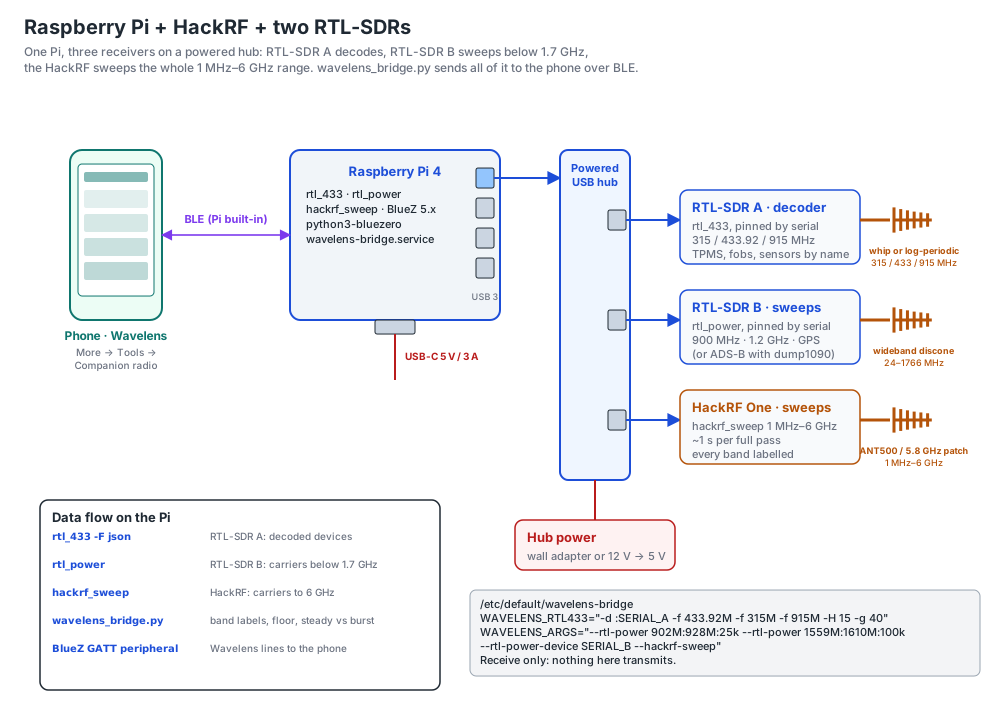
Before buying parts: the hardware compatibility page lists which Pis, dongles, hubs, power supplies, phones and ESP32 boards work, which need care, and which to avoid — from hardware that has actually run this.
Raspberry Pi setup, step by step
Skip all of this with Full Spectrum ($499): the same Pi with the bridge, dsd-fme and your area's pack already on it, plus two RTL-SDRs and a Spotter, tested together. The steps below are for building your own.
From a blank SD card to a Pi that starts on car power and shows up in Wavelens on its own. Every command is here; run them in order over SSH. Written for Raspberry Pi OS Lite (64-bit, Bookworm).
What you need
- A Raspberry Pi with built-in Bluetooth: Pi 4 or Pi 5 (best with a HackRF), Pi 3B+ or Zero 2 W (RTL-SDR only — they can't power a HackRF).
- A 16 GB or larger microSD card and a proper supply: 5 V 3 A for a Pi 4, 5 V 5 A for a Pi 5. In the car, a USB-C car adapter rated for the same.
- At least one radio: an RTL-SDR dongle (V3 or V4), a HackRF One, or both. Each wants its own antenna.
- A computer for the first setup. Windows, Mac or Linux all work; the Pi only needs Wi-Fi for installing.
- Flash the card
Install Raspberry Pi Imager. Choose your Pi model, then Raspberry Pi OS (other) → Raspberry Pi OS Lite (64-bit), then your card. When it offers Edit settings, set:
- Hostname:
wavelens-pi - A username and password (the examples below use
pi) - Your Wi-Fi network and country
- Services → Enable SSH with password authentication
Write the card, put it in the Pi, power it up and give it two minutes. Then from your computer (Windows: PowerShell or Terminal):
ssh pi@wavelens-pi.localIf the name doesn't resolve, use the Pi's IP address from your router's device list instead.
- Hostname:
- Update and install the software
sudo apt update sudo apt full-upgrade -y sudo apt install -y git curl python3-pip python3-dbus python3-gi bluez rtl-sdr rtl-433 hackrf sudo pip3 install --break-system-packages bluezerortl-sdrandrtl-433are for the RTL-SDR,hackrfprovideshackrf_sweep, andbluezerois what lets the Pi act as a Bluetooth peripheral. The--break-system-packagesflag is needed on Bookworm because the bridge runs on the system Python as a service; it only adds this one library. - Free the RTL-SDR from the TV driver, then reboot
Linux claims RTL-SDR dongles as TV tuners by default, which stops
rtl_433opening them. Skip this if you only have a HackRF.echo "blacklist dvb_usb_rtl28xxu" | sudo tee /etc/modprobe.d/rtlsdr.conf sudo rebootWait a minute and SSH back in:
ssh pi@wavelens-pi.local - Check Bluetooth and the radios
bluetoothctl show | grep -E "Controller|Powered"
rtl_test -t
hackrf_info
You want
Powered: yes;rtl_testshould sayFound 1 device(s)(press Ctrl+C to stop it);hackrf_infoshould print a board ID and serial number. Check only the radios you have. If Bluetooth showsPowered: no:sudo rfkill unblock bluetooth bluetoothctl power on - Download the bridge
cd ~
git clone --depth 1 https://github.com/pmcbrien/wavelens.git
cd ~/wavelens/companion/pi
git config core.fileMode false
chmod +x wavelens_bridge.py run-bridge.sh install-service.sh
core.fileMode falsestops Git treating thechmodas a local edit, which would otherwise blockgit pullwhen you update. - Run it once by hand
Pick the line for the radios you have. It stays in the foreground so you can see it work.
# RTL-SDR: decode 315 / 433.92 / 915 MHz, hopping every 30 s
rtl_433 -F json -f 315M -f 433.92M -f 915M -H 30 | sudo python3 -u wavelens_bridge.py --rtl433

# HackRF: energy sweep of the whole 1 MHz – 6 GHz range
sudo python3 -u wavelens_bridge.py --hackrf-sweep

# Both
rtl_433 -F json -f 315M -f 433.92M -f 915M -H 30 | sudo python3 -u wavelens_bridge.py --rtl433 --hackrf-sweep
Within a few seconds it prints a line like
advertising as 'Wavelens-3F2A' … (pair code 3F2A). Note the four-character code and leave it running. - Pair it in the app
In Wavelens open More → Companion radio. It starts looking on its own (tap Find to look again). Tap Pair on the entry whose code matches, then Blink LED — the Pi's green activity LED flashes — and Test link for the round-trip time. The pairing is remembered; from now on the app reconnects whenever the Pi is on.
Back on the Pi, stop the test with Ctrl+C.
- Make it start at boot
cd ~/wavelens/companion/pi
sudo ./install-service.sh
This copies the bridge to
/usr/local/lib/wavelens, installs thewavelens-bridgeservice, writes the settings file/etc/default/wavelens-bridgethe first time, and starts it. It waits for Bluetooth at boot and restarts itself if a radio is unplugged. - Tell the service which radios you have
Out of the box it runs the RTL-SDR only. Run one of these blocks:
# RTL-SDR only: the default, nothing to change

# HackRF only
sudo sed -i 's/^WAVELENS_RTL433=.*/WAVELENS_RTL433=""/' /etc/default/wavelens-bridge
sudo sed -i 's/^WAVELENS_ARGS=.*/WAVELENS_ARGS="--hackrf-sweep"/' /etc/default/wavelens-bridge

# RTL-SDR and HackRF together
sudo sed -i 's/^WAVELENS_ARGS=.*/WAVELENS_ARGS="--hackrf-sweep"/' /etc/default/wavelens-bridge
Then apply and confirm:
sudo systemctl restart wavelens-bridge
grep ^WAVELENS /etc/default/wavelens-bridge
Parked for body cams & radios. In the app, More → Companion radio → Park for body cams & radios makes an ESP32 keep Bluetooth on and listen to Wi-Fi channels 1, 6 and 11 only, and makes the HackRF stop sweeping and stay on 796–816 MHz, where public-safety handhelds and car radios transmit — a radio keying up nearby shows on the pass it happens. Energy only: it says a radio transmitted, never whose or what. Add
--hackrf-park-range 450:470toWAVELENS_ARGSif your area’s radios are on UHF.HackRF with a PortaPack? Mayhem boots into its own menu, where the computer can’t use it as a HackRF. The bridge switches it for you: it sends Mayhem’s
hackrfconsole command over USB, the same as tapping HackRF on the screen, and the log showsPortaPack is in HackRF mode.To point the HackRF at 5.8 GHz video only (faster passes), use
WAVELENS_ARGS="--hackrf-sweep --hackrf-range 5600:5950". To edit the file by hand instead:sudo nano /etc/default/wavelens-bridge, save with Ctrl+O, exit with Ctrl+X, then restart the service.Mask the HackRF's own spurs (do this once). Every HackRF makes a few carriers of its own, some very strong, and they'd be labelled “Federal / military microwave” or “Military radar” forever. Find yours with the antenna unscrewed (nothing on the SMA), then paste the printed value into the settings:
sudo systemctl stop wavelens-bridge
python3 ~/wavelens/companion/pi/find_spurs.py        # ~40 s, prints e.g.  --hackrf-mask 4770:4805,3215:3240
sudo systemctl start wavelens-bridge
sudo sed -i 's/^WAVELENS_ARGS=.*/WAVELENS_ARGS="--hackrf-sweep --hackrf-mask 4770:4805,3215:3240"/' /etc/default/wavelens-bridge
sudo systemctl restart wavelens-bridge
Masked ranges still feed the floor but are never reported. Keep the mask narrow (the script pads each spur by 1 MHz): anything real on those exact frequencies is hidden too.
- Check it's running
systemctl status wavelens-bridge --no-pager
journalctl -u wavelens-bridge -f
The log shows the
advertising asline and anything a radio can't do. Ctrl+C leaves the log; the service keeps running. Power-cycle the Pi once and check the app reconnects by itself. - Protect the SD card from car power cuts (recommended, do this last)
A car cuts power without warning, which can corrupt an SD card mid-write. Once everything works, make the card read-only:
sudo raspi-configPerformance Options → Overlay File System → Yes (and Yes to write-protecting the boot partition), then reboot. Changes are lost on every reboot from then on, so turn it back off the same way before updating or changing settings. Without it, shut down cleanly when you can:
sudo shutdown -h now
Two RTL-SDRs: one decodes, one sweeps
With two dongles, give each one a job and pin it by serial number, so they can't swap after a reboot. List them first:
rtl_test -tIt prints each dongle with its serial (SN: 00000001 and so on). No E4000 tuner found, aborting and PLL not locked at the end are normal for the R820T tuner nearly every dongle uses. If both show the same serial, give one a new serial with rtl_eeprom -d 1 -s 00000002 and replug it.
Then, replacing SERIAL_A (the decoder) and SERIAL_B (the sweep) with yours:
sudo sed -i 's/^WAVELENS_RTL433=.*/WAVELENS_RTL433="-d :SERIAL_A -f 433.92M -f 315M -H 15 -g 40"/' /etc/default/wavelens-bridge
sudo sed -i 's|^WAVELENS_ARGS=.*|WAVELENS_ARGS="--rtl-power 902M:928M:25k --rtl-power 1240M:1300M:100k --rtl-power 1559M:1610M:100k --rtl-power-device SERIAL_B --rtl-power-dwell 6"|' /etc/default/wavelens-bridge
sudo systemctl restart wavelens-bridge
grep ^WAVELENS /etc/default/wavelens-bridge
rtl_433 takes its serial with a colon (-d :00000001); --rtl-power-device takes it without. One --rtl-power range runs continuously; give several and they take turns on the same dongle (--rtl-power-dwell seconds each, 15 by default). The example covers the three bands most useful for Wavelens, 6 seconds each:
- 902–928 MHz — LoRa (including some LoRa GPS trackers), telemetry, meters.
- 1240–1300 MHz — long-range video and telemetry links, often on drones. The band is shared with air-traffic radars (whose sweep passes your antenna as one strong burst every ten seconds or so) and amateur 23 cm, so only a carrier that stays on across two passes in a row is reported.
- 1559–1610 MHz (GPS) — satellite signals sit far below the noise, so a wide, steady signal around GPS L1 (1563–1587 MHz) on two passes in a row is labelled possible GPS jammer nearby. Narrow spikes, the rest of the band and the first readings after each retune are ignored. The bridge keeps this band's background from creeping up, so a jammer riding with you doesn't fade out.
To watch licensed land-mobile instead, use --rtl-power 150M:174M:12.5k --rtl-power 806M:815M:12.5k — see the FCC pack for what those hits mean, and check your state's law first if the Pi rides in a car.
Or sweep everything: turn the decoder off and split the RTL-SDR's whole range between the two dongles. Each makes a full pass of its half about every 14 seconds, so it catches anything that stays on the air — links, repeaters, video, data — but misses short bursts like key fobs, tire sensors and brief key-ups, and nothing gets a name the way rtl_433 gives one. It needs a wideband antenna such as a discone on each dongle.
sudo sed -i 's/^WAVELENS_RTL433=.*/WAVELENS_RTL433=""/' /etc/default/wavelens-bridge
sudo sed -i 's|^WAVELENS_ARGS=.*|WAVELENS_ARGS="--rtl-power 24M:895M:250k@SERIAL_A --rtl-power 895M:1766M:250k@SERIAL_B"|' /etc/default/wavelens-bridge
sudo systemctl restart wavelens-bridge
@SERIAL on a range puts it on that dongle; ranges without one use --rtl-power-device. Hits on phone uplink bands (600/700/800/850 MHz and AWS) are labelled as a phone transmitting nearby — very often your own.
- Antennas: dongles sold for aircraft tracking come with a short 1090 or 978 MHz antenna (about 7 cm), which hears little at 433 MHz. Use the telescopic or dipole antenna that came with the dongle, about 17 cm per element for 433 MHz.
- One program per dongle: if the Pi also runs PiAware or another dump1090, that program holds a dongle. To give both dongles to Wavelens, stop it with
sudo systemctl disable --now piaware dump1090-fa dump978-fa(undo withsudo systemctl enable --now dump1090-fa dump978-fa piaware). A dongle with serial 00000978 usually belongs todump978-fa.
Optional: aircraft (ADS-B)
Needs a second RTL-SDR with a 1090 MHz antenna and dump1090-fa or readsb already running on the Pi (a PiAware install provides one). Each program needs its own dongle; pin rtl_433 to the other one by serial as shown above. Then add the feed:
sudo sed -i 's|^WAVELENS_ARGS="\(.*\)"|WAVELENS_ARGS="\1 --dump1090 localhost:30003"|' /etc/default/wavelens-bridge
sudo systemctl restart wavelens-bridge
Optional: name licensed carriers (FCC pack)
Builds the local license pack for where you drive. The FCC files are large (about 750 MB together), so make sure the card has room, and replace ST and the county with your own:
mkdir -p ~/uls && cd ~/uls
curl -O https://data.fcc.gov/download/pub/uls/complete/l_LMpriv.zip
curl -O https://data.fcc.gov/download/pub/uls/complete/l_LMcomm.zip
cd ~/wavelens/companion
python3 tools/fcc_local_pack.py --zip ~/uls/l_LMpriv.zip --zip ~/uls/l_LMcomm.zip \
    --state ST --county "Your County" -o fcc-local.json
sudo install -m 0644 fcc-local.json /usr/local/lib/wavelens/
sudo sed -i 's|^WAVELENS_ARGS="\(.*\)"|WAVELENS_ARGS="\1 --fcc-pack /usr/local/lib/wavelens/fcc-local.json"|' /etc/default/wavelens-bridge
sudo systemctl restart wavelens-bridge
rm -rf ~/uls
Only add --fcc-pack once the file is in place: if it points at a missing file the bridge exits and the service keeps restarting. Check with ls -lh /usr/local/lib/wavelens/fcc-local.json.
Repeat --county for each county, or use --lat 00.0 --lon -00.0 --radius-km 50 for a radius around a point. Rebuild the pack when you move; the FCC refreshes the files weekly.
Older cards: Raspbian Buster and PiAware images
A card that has been running for years — a PiAware feeder, say — is often still on Raspbian 10 “Buster”. Check with grep PRETTY /etc/os-release. The bridge can run on it, but these come up; a fresh card with current Raspberry Pi OS is usually quicker than fixing them all.
apt updateends withE: The repository … does not have a Release file: a third-party package source has gone away (FlightAware's Buster source has). Comment it out and rerun:sudo sed -i 's|^deb .*flightaware.*|#&|' /etc/apt/sources.list /etc/apt/sources.list.d/*.list, thensudo apt update.- pip: leave off
--break-system-packages— Buster's pip doesn't know it. Usesudo pip3 install bluezero. - No
rtl-433package: build it (about 10 minutes on a Pi 4):
sudo apt install -y git cmake build-essential librtlsdr-dev libusb-1.0-0-dev rtl-sdr
cd ~ && git clone --depth 1 https://github.com/merbanan/rtl_433.git
cd rtl_433 && mkdir -p build && cd build && cmake .. && make -j4 && sudo make install
rtl_433 -V
dpkg: unrecoverable fatal error … files list file for package 'X' is missing final newline: the package database was damaged, usually by a power cut mid-write. Move that file aside and reinstall the package, then check the rest:
Replacesudo mv /var/lib/dpkg/info/X.list ~/X.list.broken sudo apt install --reinstall -y X sudo dpkg --configure -a sudo dpkg --auditXwith the package named in the error.dpkg --auditprinting nothing means it's clean; if several packages are damaged, the card is failing — flash a new one.- Don't run
sudo apt autoremovewhen apt suggests it after removing PiAware: it can takertl-sdrwith it. bluetoothctl showprints nothing: no adapter is registered. Check, in order:grep -iE "bt|bluetooth" /boot/config.txt(comment out anydisable-btoverlay and reboot);dpkg -l bluez pi-bluetooth bluez-firmware | grep ^ii(install what's missing);systemctl is-enabled bluetooth hciuart;rfkill list. Ifrfkill listis empty too, the chip never started:systemctl status hciuart --no-pager -landdmesg | grep -iE "hci|bluetooth|brcm"say why.
Updating and removing
# Update to the latest bridge (your settings file is kept)
cd ~/wavelens && git config core.fileMode false && git pull
cd ~/wavelens/companion/pi && sudo ./install-service.sh

# Remove the service (settings file is kept)
cd ~/wavelens/companion/pi && sudo ./install-service.sh --remove
If something doesn't work
| Symptom | Fix |
|---|---|
| Not listed under Find in the app | Check the log shows advertising as. Then sudo systemctl restart bluetooth wavelens-bridge. Keep the phone within a few metres for pairing; the app's Not showing up? section has a pair-by-address field. |
ModuleNotFoundError: No module named 'bluezero' | Rerun sudo pip3 install --break-system-packages bluezero — with sudo, since the service runs as root. |
usb_claim_interface error -6 from rtl_433 | The TV driver still has the dongle: do step 3 and reboot. |
HackRF not found, and lsusb shows 1d50:6018 (a serial device, ttyACM0) | It's a HackRF with a PortaPack running Mayhem, in its own on-screen mode. The bridge switches it to HackRF mode by itself (look for PortaPack is in HackRF mode in the log); if it doesn't, choose HackRF on the PortaPack, or set --portapack-port /dev/ttyACM0. It comes back as 1d50:6089 and hackrf_info finds it. |
hackrf_open() failed or HACKRF_ERROR_NOT_FOUND | Run hackrf_info. Use a short, good USB cable straight into the Pi (blue USB 3 port on a Pi 4/5) and a full-rated power supply. |
| Random restarts, or a lightning-bolt icon on a connected screen | Under-voltage. vcgencmd get_throttled should print throttled=0x0. Use the right supply, or put the HackRF on a powered USB hub. |
cd: …/companion/pi: No such file or directory | The download in step 5 didn't happen, usually because git wasn't installed yet. Run git --version, install git if needed, then repeat step 5. |
git pull says Your local changes … would be overwritten by merge | Usually just the chmod. Run cd ~/wavelens && git config core.fileMode false && git stash && git pull, then reinstall the service. |
Service restarts every few seconds; log says unrecognized arguments | The installed bridge is older than your settings. Update (git pull), then rerun sudo ./install-service.sh — that's what copies the new bridge into place. |
usb_claim_interface error -6 with the TV driver already blacklisted | Another program has the dongle, often PiAware's dump1090-fa or dump978-fa: systemctl is-active piaware dump1090-fa dump978-fa, then sudo systemctl disable --now the ones that are active. |
No E4000 tuner found, aborting or PLL not locked from rtl_test -t | Normal for R820T dongles. What matters is the Found N device(s) line above it. |
| The same “Federal / military microwave” or “Military radar” at one frequency, over and over, very strong, indoors | A spur the HackRF makes itself; every unit has a few (one of ours sits near 3235 and 4780–4800 MHz). Not a signal in the room: unscrew the antenna and it's still there. Mask it for good with find_spurs.py and --hackrf-mask (setup step above). Unmasked, it's treated as always-on after three minutes (shown once a minute, never counted by the overload filter); lowering the gain (--hackrf-lna 16) shrinks it. |
| A key-up right next to the Pi isn't reported, while far-off things are | Overload: the handheld swamped the receiver. Move it a few metres away and lower the HackRF gain. Hits 30 dB over the floor are never dropped by the overload filter, and the filter only judges bands that rose in the last ten seconds (the receiver's own spurs, hot for minutes, don't count), so at a sensible distance the radio always gets through. If it still doesn't, the bridge is older than this guide: update it. |
Service restarts every few seconds; log mentions fcc-local.json | The FCC pack path in WAVELENS_ARGS points at a missing file. Copy the pack there, or remove --fcc-pack … from the line. |
does not have a Release file, missing final newline, or bluetoothctl show prints nothing | See Older cards above. |
Failed to register advertisement | The bridge now exits and the service restarts Bluetooth before trying again, so it recovers by itself within about 15 seconds. If it keeps failing: sudo systemctl stop wavelens-bridge, sudo systemctl restart bluetooth, then start the bridge. Only one program at a time can advertise as the Wavelens service. |
rtl_433 stopped sending; exiting every 5 seconds, with no “Found … tuner” line | rtl_433 can't open its dongle, usually because it dropped off USB (under-voltage) or was unplugged. lsusb | grep 0bda should list every RTL-SDR; rtl_433 -d :SERIAL -F log -T 5 prints the actual error. Replug the dongle, and fix the power. |
| Stopping or restarting the service takes 90 seconds | An SDR tool hung on its USB device. Update: the service now gives the radios 8 seconds, then stops them. |
Forty minutes of compiling you can skip. Full Spectrum, $499, is this Pi already imaged, with the bridge, decoders and start-on-boot installed and tested, plus two pre-configured RTL-SDRs and a Spotter. Already have a Pi? Add pre-configured RTL-SDRs, $40 each.
Carputer
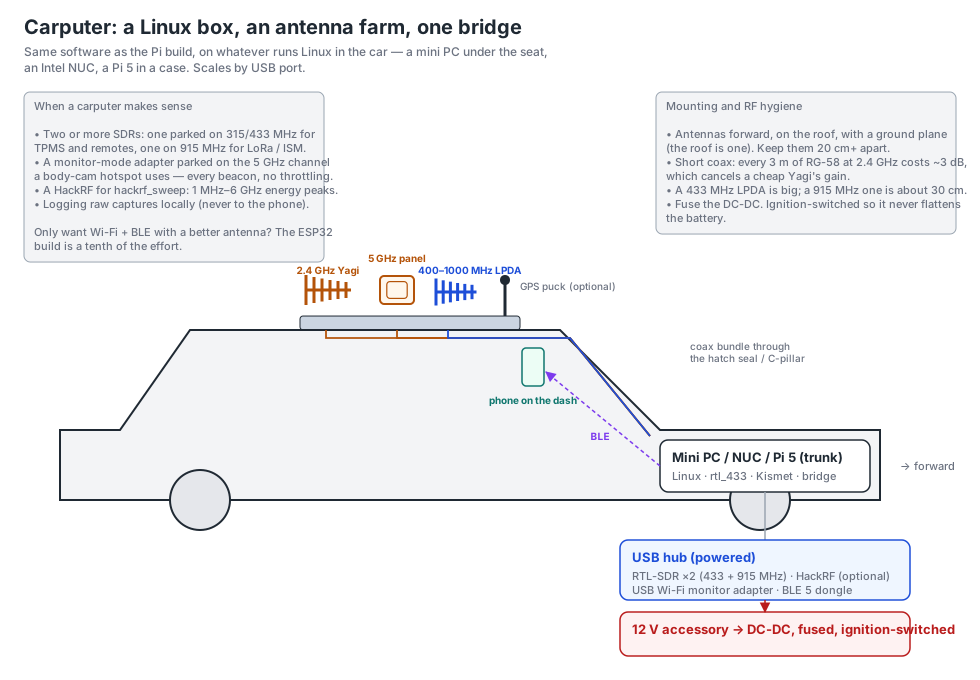
The same bridge script on whatever runs Linux in the car. It scales by USB port: an RTL-SDR parked on 315/433 MHz, another on 915 MHz, a HackRF sweeping, a Wi-Fi adapter parked on one 5 GHz channel, an antenna for each on the roof.
RTL-SDR vs HackRF
RTL-SDR (24–1766 MHz) is for decoding. With rtl_433 it names things: a Schrader tyre sensor, an Acurite weather station, a garage remote. Its ceiling is 1.7 GHz, so it never hears Wi-Fi, Bluetooth or 5.8 GHz video.
HackRF (1 MHz–6 GHz) is for energy. With hackrf_sweep it covers the whole range in about a second and the bridge reports what stands out over the noise floor, labelled by band from the US allocation table: 5.8 GHz video (or Wi-Fi channel 149 and up — a sweep cannot tell), 1.2 GHz and drone command links, radio altimeters on low aircraft, civil and military air bands, steady 900 MHz toll and RFID readers, phone and satellite-phone uplinks, walkie-talkies, 4.9 GHz public-safety links, GPS jamming on L1 and L5. Broadcast and cell-tower downlinks are shown at most once a minute; Wi-Fi bands are skipped. Short, rare bursts (a key fob, a tyre sensor) are mostly missed — that is the RTL-SDR’s job. That is “something is transmitting here,” not “this is device X,” and the app shows it as Possible with the same uncertainty ring as anything else. It does not demodulate Wi-Fi usefully (a $15 monitor-mode adapter does that better) and cannot pick a camera's LTE modem out from the phones in the cars around you. The bridge is receive-only and so should you be.
hackrf_sweep sets.ESP32 + CC1101 / SX1276 is the no-Pi way to get a useful subset of rtl_433's decoders on a $5 module, tuned to one frequency at a time. ADS-B via dump1090 puts aircraft overhead in the detail view with callsign, altitude and position; they are left unclassified because an airliner is not a drone.
Need a dongle? The pre-configured RTL-SDR, $40, is an RTL-SDR Blog V3 with a mag-mount antenna, tested with the bridge and pinned to its job by serial number. Get two: one for sensors, one for the scanner.
Frequencies, and what a hit means
What each radio can hear, how the bridge decides a hit is worth sending, the setups we run, and every band it labels. The band table is generated from the bridge's own code, so it always matches what your companion does.
What each radio covers
| Radio | Range | How it listens |
|---|---|---|
| Phone | 2.4 GHz Bluetooth, 2.4 / 5 GHz Wi-Fi, cell | Decodes packets; Wi-Fi throttled by the OS to a sweep every few seconds |
| ESP32 | 2.4 GHz Wi-Fi + BLE (5 GHz too on an ESP32-C5) · RX5808: 5645–5945 MHz · CC1101: 300–348, 387–464, 779–928 MHz | Decodes packets, parks on the channels you pick |
| RTL-SDR + rtl_433 | 315, 433.92, 915 MHz (any frequency 24–1766 MHz) | Decodes hundreds of device protocols by name and ID: tire sensors, fobs, remotes, sensors |
| RTL-SDR + rtl_power | 24–1766 MHz | Energy sweep of the ranges you give it; several take turns, a few seconds each |
| HackRF + hackrf_sweep | 1 MHz–6 GHz | Energy sweep of the whole range about once a second, or a 20 MHz slice when parked |
How the bridge decides what to send
- Over the noise: each frequency bin keeps a rolling noise floor (about 40 s). A sweep hit is sent when a bin rises 18 dB above it. Once a bin is being reported its floor rises fifteen times more slowly, so a radio held keyed or a video link keeps reporting for minutes; a bin hot for a few minutes straight then becomes background (once a minute). On a drive, towers and broadcast fade into the floor between visits.
- Two passes in a row for drone and video bands (1.2 GHz, 5.8 GHz, 5030–5091 MHz, 2 GHz news links, 4.9 GHz): a video link transmits continuously, while an air-traffic radar's beam or a glitch shows once.
- Burst or steady: where one band means two things (902–928 MHz: LoRa bursts or a toll reader; 5850–5925 MHz: connected-vehicle bursts or FPV video), a carrier still there after three passes gets the steady label.
- GPS jamming: judged only around GPS L1 (1563–1587 MHz) and L5 (1166–1187 MHz). It needs a wide rise across at least a quarter of a slice, on two passes in a row. Narrow spikes and the rest of the GNSS band are ignored, and that band's floor rises very slowly so a jammer riding with you stays visible.
- Precision: a carrier spreads over two or three sweep bins, so only the peak bin reports, and the bridge fits a parabola through the peak and its neighbours to place the carrier within about a quarter of a bin: with
--hackrf-bin 100000a radio on 446.075 reads 446.075 ± 0.025. The card shows that figure to the kHz (446.075 MHz); the id and alerts still use the whole-MHz bucket so a drifting carrier stays one entry. What remains is the radio's own crystal error, up to ±20 ppm on a HackRF (9 kHz at 450 MHz, 100 kHz at 4.8 GHz). Measure it once: key a handheld on a known frequency, read the carrier figure, thenppm = (known − read) / read × 1,000,000and add--hackrf-ppm <value>toWAVELENS_ARGS(a value between −20 and 20 is normal). For RTL-SDRs,rtl_test -pmeasures it and--rtl-ppmpasses it to rtl_power; TCXO dongles need 0. The RTL-SDR sweep at 12.5 kHz bins is channel-exact. - Settling: the first reading after each retune is thrown away while the tuner settles.
- Overload: an SDR with no front-end filter, especially a HackRF, overloads when a strong transmitter is right beside it (the phone, the Pi's own Wi-Fi). False carriers then appear across the spectrum at once, at about the same level. A strong signal can cause it too: a radar's main beam sweeping past (ships offshore, airports, weather radar). When four or more unrelated bands rise within 2.5 seconds, the bridge keeps the strongest (the likely cause) and anything 30 dB or more over its floor (a strong radio nearby), drops the weaker rest, and the Companion radio screen says so. “Rise” is the word: only bands that came up in the last ten seconds count, and only those can be dropped. Anything that has been hot longer (a spur, a steady carrier) is established, goes through untouched, and is not “a band that rose together” with a key-up. Without that rule a receiver with a few permanent spurs would look overloaded in every window and drop every key-up. And the cause is chosen by sense, not just strength: when one of the bands that rose is one where a transmitter beside the receiver is the normal explanation (two-way radio, phone, key fob), that hit is kept and the “4.7 GHz microwave” and “S-band radar” that rose with it are dropped as the receiver's own products of it, even when they read stronger — an overloaded HackRF does that. Several fresh carriers in one band at once (a 435–441 comb from one handheld on 2 m) collapse to the strongest, and a hit at 2×/3×/4× a stronger one is dropped as its harmonic. A 1 MHz bucket hot for three minutes straight is a fixed transmitter or one of the receiver's own spurs (a HackRF shows a few, some near full scale): it becomes background, shown once a minute. Radar hits are grouped as one entry per radar band. Keep the phone and the Pi's Wi-Fi away from the antenna, and lower the HackRF gain (
--hackrf-lna 16) if it happens often. - Background (broadcast, cell-tower downlinks, navigation beacons, satellites): at most once a minute per band, never an alert. Skipped: 2.4 and 5 GHz Wi-Fi, Wi-Fi 6E, GPS L2 and long-range radar (1215–1240, 1300–1390 MHz), radio astronomy (1400–1427 MHz).
- Every sweep hit is Possible: energy only, nothing demodulated, no radio IDs decoded. Levels are relative to the radio's full scale, so the app shows them as dB with no distance estimate. Phone-uplink hits are very often your own phone.
Setups we run
| Hardware | /etc/default/wavelens-bridge |
|---|---|
| One RTL-SDR | WAVELENS_RTL433="-f 433.92M -f 315M -H 15 -g 40"WAVELENS_ARGS="" |
| Two RTL-SDRs | WAVELENS_RTL433="-d :SERIAL_A -f 433.92M -f 315M -H 15 -g 40"WAVELENS_ARGS="--rtl-power 902M:928M:25k --rtl-power 1240M:1300M:100k --rtl-power 1559M:1610M:100k --rtl-power-device SERIAL_B --rtl-power-dwell 6" |
| Two RTL-SDRs + HackRF | As above, adding --rtl-power 450M:470M:12.5k for channel-exact UHF and --hackrf-sweep --hackrf-range 1:6000 --hackrf-lna 16 --hackrf-bin 100000: the whole 1 MHz–6 GHz, with the LNA gain lowered so a radio keyed nearby doesn't overload it and 100 kHz bins (±50 kHz, and about 7 dB more sensitive to narrowband voice than the 500 kHz default). --hackrf-range 5600:5950 instead sweeps 5.8 GHz video only, with faster passes. |
| Whole RTL-SDR range, no decoder | WAVELENS_RTL433=""WAVELENS_ARGS="--rtl-power 24M:895M:250k@SERIAL_A --rtl-power 895M:1766M:250k@SERIAL_B" |
Serials come from rtl_test -t. Park for body cams & radios in the app switches a HackRF bridge to 796–816 MHz, where handhelds and car radios transmit (700 MHz public-safety mobile and 800 MHz repeater inputs), and an ESP32 to Wi-Fi channels 1, 6 and 11 with BLE on. A radio keying up nearby is then caught on the pass it happens. Check your state's law before sweeping public-safety bands from a car (see the FCC pack).
As many radios as you have
The bridge adapts to what is plugged in. At every start it counts the RTL-SDR dongles and looks for a HackRF, then hands out jobs: one dongle alone decodes sensors (tyre pressure, 315/433/915 MHz); two make the scanner — one sweeps VHF, UHF and 800 MHz while the other listens, follows and tracks trunked systems, so the sweep never pauses and the two never fight over one USB device (no sensor decoding with two: the scanner needs both); a third brings the sensor decoder back; with four, VHF and UHF get a dongle each; a fifth takes the 900 MHz, 1.2 GHz and GNSS ranges; the HackRF, if there is one, sweeps everything from 1 MHz to 6 GHz. Plug in another and it is taken up within seconds; nothing to configure. (Leave the dongle lines in the settings file empty for this; name a dongle in WAVELENS_RTL433 to pin the sensor decoder by hand.) Four radios on a Pi need a powered USB hub.
Phone, ESP32 and Pi together: who hears what
Wavelens holds two Bluetooth links: the main companion (the Pi with the SDRs — the scanner, listening, spectrum, journal) and a second companion (a bare ESP32 as a Wi-Fi / Bluetooth sniffer). Pair them in any order: the one that reports a scanner becomes the main one by itself. Nothing is handed off between radios — every one of them listens, and their hits merge in the phone by address, strongest signal first, so a body cam heard by the ESP32 and by the phone is one device on Live and Alerts.
| Phone | ESP32 (second) | Pi + RTL-SDR (main) | |
|---|---|---|---|
| Body cams, cruiser routers, in-car video, doorbells (Wi-Fi / Bluetooth) | yes, always | yes — same frames, same signatures, same Confirmed / Likely rules | no (its Bluetooth is the link to the phone) |
| Trackers, phones, wearables, drones (Remote ID) | yes | yes | no |
| Licensed radio: keying up, repeaters, trunked systems, the scanner | no | no | yes — sweep, Listen, Follow, trunking, FCC pack |
| Tyre-pressure and other 315/433/915 MHz sensors | no | no | with a third dongle |
| Riding with you / following you, fixed vs moving | the phone's own GPS track decides, whichever radio heard the device | ||
So the ESP32 does not take over body-cam detection from the phone; it adds position and timing. On the dash or roof with a directional antenna it hears a camera before the phone in a pocket does, and with Park for body cams & radios it sits on Wi-Fi channels 1, 6 and 11 with Bluetooth on, catching an advertisement within a second instead of whenever the phone's channel hop lands there — Android sets the phone's scan schedule and throttles it with the screen off; the ESP32 never throttles.
Hearing a hit
A scanner for your own SDR hardware: Listen, Follow hits, squelch, digital voice and trunk-tracking are in the Play Store app. Pager decoding is the one part kept to Wavelens Lab, the author's private build. The bridge serves both.
On a sweep hit's detail sheet, Listen asks the bridge to tune an RTL-SDR to that carrier and play it on the phone. The bridge borrows the dongle that runs rtl_power (that sweep pauses; the HackRF and rtl_433 carry on), runs rtl_fm, and streams 8 kHz audio over the same Bluetooth link at about 4 kB/s. Narrow FM for radios, AM on the 118–137 MHz air band, wide FM for broadcast, picked by frequency. Squelch on the Pi keeps the link idle between transmissions; it stops by itself after five minutes unless the app renews it, and the sweep resumes. Follow hits (Companion screen, or the Live tab's companion line) turns it into a scanner: every fresh carrier the sweep finds in a voice band — air band AM, marine, ham, GMRS/FRS, business and analog public-safety FM, CB — is tuned and played until the channel goes quiet or 30 seconds are up, then the newest waiting signal takes over; a channel just played is left alone for a minute so a busy repeater or a paging transmitter can't hog it. The squelch has −/+ on the listening line: lower hears weaker signals with more static, higher stays silent until a real carrier. The RTL-SDR covers 24–1766 MHz, so hits above that can't be listened to.
On the right channel. A sweep places a carrier to about ±25 kHz (HackRF) or ±3 kHz (RTL-SDR); radios sit on channel rasters. The listen starts on the likeliest channel for the reading (12.5 and 6.25 kHz land mobile, 15/5 kHz on 2 m, 25 kHz air and marine, the FRS/GMRS list), then hones: on analog FM the demodulator's DC level says how far the carrier is from the tuned frequency, to about 100 Hz after half a second of speech, and the listen retunes to the channel that points at. Set --rtl-ppm from rtl_test -p once, or an uncorrected dongle's crystal error (10–20 kHz at 450 MHz on a cheap one) looks like a wrong channel.
Digital voice, detected. Listen starts in AUTO: the decoder looks for DMR and P25 sync, names what it finds (“AUTO · DMR” on the listening line), and if the carrier is on with no digital sync for three seconds, falls back to narrow FM. The mode button overrides it: AUTO → FM → DMR → P25 → NXDN → AM on the same carrier. Digital modes need dsd-fme on the Pi, installed once with sudo ~/wavelens/companion/pi/install-dsd.sh (about ten minutes to build; it asks you to read the mbelib patent notice first). Conventional DMR (ham and business repeaters), P25 phase 1, NXDN and D-STAR play as voice; encrypted talkgroups stay silent. Trunked systems — most 800 MHz public-safety networks, which hop channels under a control channel — are followed from their control channel (see Trunked systems below), not by Follow's channel-by-channel listening. Receive only: nothing transmits. Needs a dongle pinned with @SERIAL in --rtl-power (or --listen-device SERIAL); --listen-squelch 0 gives static between transmissions if you'd rather hear the channel open.
Pager data, decoded (Wavelens Lab only). With multimon-ng on the Pi (sudo apt install multimon-ng; install-dsd.sh adds it too), every analog listen also runs a POCSAG/FLEX decoder on the same audio. The first page decoded marks the channel as pager data, mutes the audio (it's tone bursts and squeal) and the pages appear in three places: the last few under the companion line on the Live tab, the list on the Companion radio screen, and More → Pages, a page-only view — each message large, with its time, address, protocol and frequency, and address chips to show one station's pages — newest first, kept in memory only, never written to disk. Pages are also read aloud as they arrive, through the same voice as the alerts (switch on the Companion radio screen or the Pages screen; the main voice switch governs both). On Follow this is automatic: a fire-dispatch paging channel gets decoded instead of played. Which channels this is lawful for depends on the system: public-safety dispatch paging on an agency's own system is radio “readily accessible to the general public” under 18 U.S.C. § 2511(2)(g); messages on a commercial paging carrier's network are not, and decoding them is an offence. The decoder runs on the frequency you tuned, nothing more.
RadioReference overlay. Export your county's frequency list from RadioReference (the CSV on each county page) and give it to the bridge with --rr-pack; sweep hits are then named the way the list names them — agency, description, alpha tag, mode and tone — on both the repeater output and the input side (a hit on the input is a radio keying up near you). Listen picks the right demodulation from the mode column, trunked-system sites are labelled as such, and the agency-type alerts work from the list's tags. The export stays on your Pi.
Trunked systems. Turn on Trunked systems on the Companion radio screen and tap Lock onto the nearest system — there is no frequency to look up. The Pi finds the control channel itself: the one that worked last time, the control channels marked in your RadioReference list (nearest site first), or a quick scan of the trunking bands for the carrier that never stops transmitting. It tries each with both P25 demodulations (C4FM, and QPSK for the simulcast sites most large county systems use) and locks onto the first that syncs. APCO P25 phase 1 and 2 and DMR work; the Pi runs dsd-fme, which decodes the call grants and hops the dongle to each voice channel and back. The listening line shows the talkgroup — never the radio ID of whoever is talking. Encrypted calls are shown but never tuned. Unencrypted public-safety trunked traffic is lawful to receive in the US; a receiver in a vehicle is a matter of state law.
Lock out. A pager or a busy repeater would take every Follow turn. Lock out on the listening line, or on a hit's sheet, puts that frequency (±20 kHz) on a list Follow never tunes; the Companion radio screen shows the list, tap one to remove it. The list lives on the phone and is sent to the bridge on every connect.
From a Windows, Mac or Linux computer
The companion is a Bluetooth LE peripheral speaking one line protocol, so a computer can be a client too. wavelens_desktop.py (free, in the companion folder) finds the nearest companion, prints every hit as it arrives, takes listen, follow, lockout, park and sq at a prompt, and plays Listen audio through the computer's speakers. Windows works with the built-in Bluetooth adapter; no pairing in Settings, the companion doesn't bond.
pip install bleak sounddevice
python wavelens_desktop.py            # or --name Wavelens-3F2A, --raw for the JSON lines
One client at a time: disconnect the phone first (More → Companion radio → Disconnect), or the computer won't find it. Listen and Follow from the computer need the same SDR bridge as from the phone, and the same caveats apply.
Watching what the Pi hears
Add --echo to WAVELENS_ARGS and every line the bridge sends to the phone also goes to the journal. Live:
journalctl -u wavelens-bridge -f | grep --line-buffered '"t":"rf"'Each hit is one JSON line: "n" the label, "f" MHz, "r" level, "src" which radio heard it, and under "x" the bin centre, how far over the noise it was, and anything decoded. A summary of the last hour, most frequent first:
journalctl -u wavelens-bridge --since "1 hour ago" -o cat | grep '"t":"rf"' | sed 's/^sent //' | python3 -c '
import sys, json
for l in sys.stdin:
    try: d = json.loads(l)
    except ValueError: continue
    print(f"{d.get(\"f\",\"\"):>6} MHz  {d.get(\"r\",\"\"):>5} dB  {d.get(\"src\",\"\"):9} {d.get(\"n\",\"\")}")
' | sort | uniq -c | sort -rn | head -40
On the phone, More → Companion radio → Live packets shows the same lines as they arrive (the last 200). Take --echo off for long drives: at a hit a second it's about a megabyte an hour of journal on the SD card.
Testing with a handheld. Wait a minute after a restart first: the HackRF reports nothing for its first 60 seconds while it learns the floor (its gains arrive late and the first pass reads 30–40 dB low; reporting during that minute gave a flood of false carriers and false GPS-jammer alerts). Then key for about ten seconds with the radio a few metres from the antenna, then unkey. The hit appears within about three seconds (reports are held 2.5 s for the overload check). Right beside the antenna the receiver overloads and the reading is unreliable; keyed for minutes on end the carrier eventually becomes background. For Find it on a sweep hit, key in bursts and walk slowly: a sweep updates each band at most every two seconds.
Every band the bridge labels
Show all ranges, in the bridge's order (where ranges overlap, the earlier row wins)
| Range | Reported as | Category | When |
|---|---|---|---|
| Skipped outright | |||
| 2400–2500 MHz | 2.4 GHz Wi-Fi / BLE / microwave ovens | Not reported | |
| 5150–5644 MHz | 5 GHz Wi-Fi (also airport weather radar 5600–5650) | Not reported | |
| 5926–6000 MHz | Wi-Fi 6E | Not reported | |
| 1215–1240 MHz | GPS L2 + long-range air-traffic radar bursts | Not reported | |
| 1300–1390 MHz | long-range air-traffic and military radar | Not reported | |
| 1400–1427 MHz | radio astronomy: protected, nothing should transmit | Not reported | |
| 1–26.96 MHz | AM broadcast and HF: worldwide propagation, nothing nearby | Not reported | |
| 27.41–30 MHz | HF (CB at 26.96–27.41 stays: a transmitter nearby) | Not reported | |
| Narrow, specific | |||
| 121.4–121.6 MHz | Aviation emergency frequency 121.5 MHz (ELT beacon or guard call) | Unclassified | Each burst over the noise floor |
| 242.9–243.1 MHz | Military aviation emergency frequency 243.0 MHz (beacon or guard call) | Unclassified | Each burst over the noise floor |
| 406–406.1 MHz | 406 MHz distress beacon (EPIRB / PLB / ELT) | Unclassified | Each burst over the noise floor |
| 161.95–162.05 MHz | AIS: ship or boat position transponder nearby | Unclassified | Each burst over the noise floor |
| 144.37–144.41 MHz | APRS 144.39 MHz: amateur position beacon | Unclassified | Each burst over the noise floor |
| 462.54–462.74 MHz | Walkie-talkie nearby (FRS / GMRS) | Unclassified | Each burst over the noise floor |
| 467.54–467.74 MHz | Walkie-talkie nearby (FRS / GMRS) | Unclassified | Each burst over the noise floor |
| 978–978.5 MHz | Aircraft ADS-B (978 MHz UAT): small plane nearby | Unclassified | Each burst over the noise floor |
| 1029.5–1030.5 MHz | Secondary radar interrogation (1030 MHz): airport or military radar nearby | Unclassified | Each burst over the noise floor |
| 1089.5–1090.5 MHz | Aircraft transponder (1090 MHz, Mode S / ADS-B) nearby | Unclassified | Each burst over the noise floor |
| 26.96–27.41 MHz | CB radio transmitting nearby (trucks, CB users) | Vehicle | Each burst over the noise floor |
| Unlicensed Part 15 / ISM devices | |||
| 314–316 MHz | 315 MHz burst (TPMS, key fob) | Vehicle | Each burst over the noise floor |
| 299–319 MHz | Key fob or garage remote (300–318 MHz) | Vehicle | Each burst over the noise floor |
| 389.5–390.5 MHz | Garage remote (390 MHz) | Vehicle | Each burst over the noise floor |
| 433.05–434.79 MHz | 433 MHz ISM burst (remotes, sensors, TPMS) | IoT / sensor | Each burst over the noise floor |
| 902–928 MHz | 900 MHz ISM burst (LoRa, telemetry, meters) | IoT / sensor | Bursts as shown; a carrier still there after 3 passes becomes “Steady 900 MHz carrier: meter collector, LoRa gateway, cordless phone — or a toll / RFID reader on the road” |
| 863–870 MHz | 868 MHz ISM burst (EU LoRa, sensors) | IoT / sensor | Each burst over the noise floor |
| 49.8–49.9 MHz | 49 MHz baby monitor, toy or old cordless phone | IoT / sensor | Each burst over the noise floor |
| 72–76 MHz | 72 MHz steady carrier: radio-control model (RC aircraft), or hearing-assist / paging | Drone / video link | Only when it's on two passes in a row |
| Video and drone links | |||
| 5645–5849 MHz | 5.8 GHz steady carrier: FPV video, or a busy Wi-Fi access point | Drone / video link | Only when it's on 6 passes in a row (Wi-Fi comes and goes; analog video doesn't) |
| 5850–5925 MHz | 5.9 GHz burst: connected-vehicle radio (C-V2X roadside unit or vehicle) | Vehicle | Bursts as shown; a carrier still there after 3 passes becomes “5.9 GHz steady carrier: FPV video on a high channel, or Wi-Fi ch 169–177” |
| 5030–5091 MHz | Drone command-link band (5030–5091 MHz, aviation UAS control) | Drone / video link | Only when it's on two passes in a row |
| 5091–5150 MHz | Airport surface network (AeroMACS) | Network | Each burst over the noise floor |
| 1240–1300 MHz | 1.2 GHz carrier: video or telemetry link (also ham 23 cm) | Drone / video link | Only when it's on two passes in a row |
| 2025–2110 MHz | News / broadcast video link (2 GHz: ENG trucks, news helicopters) | Camera | Only when it's on 6 passes in a row (Wi-Fi comes and goes; analog video doesn't) |
| 4940–4990 MHz | 4.9 GHz public-safety link (camera / video backhaul, mesh) | Network | Only when it's on two passes in a row |
| Aircraft | |||
| 4200–4400 MHz | Radio altimeter: aircraft flying low overhead (helicopter, plane on approach, large drone) | Unclassified | Each burst over the noise floor |
| 118–137 MHz | Aircraft or airport radio (VHF air band) | Unclassified | Each burst over the noise floor |
| 108–118 MHz | Aviation navigation beacon (VOR / ILS) | Unclassified | Background: once a minute per band, never an alert |
| 960–1215 MHz | Aviation navigation (DME / TACAN beacons) | Unclassified | Background: once a minute per band, never an alert |
| 225–400 MHz | Military / government UHF: military aviation, tactical radio, SATCOM | Unclassified | Each burst over the noise floor |
| 1435–1525 MHz | Flight-test / aeronautical telemetry (L-band) | Unclassified | Each burst over the noise floor |
| 2360–2395 MHz | Flight-test / aeronautical telemetry (S-band) | Unclassified | Each burst over the noise floor |
| 2200–2290 MHz | Federal telemetry: space operations, flight test, military UAV links | Unclassified | Each burst over the noise floor |
| Phones and satellite terminals transmitting (uplinks | |||
| 663–698 MHz | Phone transmitting nearby (600 MHz LTE uplink) | Phone | Each burst over the noise floor |
| 699–716 MHz | Phone transmitting nearby (700 MHz LTE uplink) | Phone | Each burst over the noise floor |
| 777–787 MHz | Phone transmitting nearby (700 MHz LTE uplink) | Phone | Each burst over the noise floor |
| 788–798 MHz | Phone or public-safety LTE (FirstNet) transmitting nearby | Phone | Each burst over the noise floor |
| 799–805 MHz | Radio keying up nearby (700 MHz public-safety mobile) | Unclassified | Each burst over the noise floor |
| 806–815 MHz | Radio keying up nearby (800 MHz repeater input) | Unclassified | Each burst over the noise floor |
| 815–824 MHz | Phone transmitting nearby (LTE band 26 uplink) | Phone | Each burst over the noise floor |
| 824–849 MHz | Phone transmitting nearby (850 MHz cellular uplink) | Phone | Each burst over the noise floor |
| 1710–1780 MHz | Phone transmitting nearby (AWS LTE uplink) | Phone | Each burst over the noise floor |
| 1850–1920 MHz | Phone transmitting nearby (PCS uplink) | Phone | Each burst over the noise floor |
| 2000–2020 MHz | Phone transmitting nearby (AWS-4 uplink) | Phone | Each burst over the noise floor |
| 2305–2315 MHz | Phone transmitting nearby (WCS uplink) | Phone | Each burst over the noise floor |
| 1610–1626.5 MHz | Satellite phone or tracker transmitting nearby (Globalstar / Iridium) | Phone | Each burst over the noise floor |
| 1626.5–1660.5 MHz | Satellite terminal transmitting nearby (Inmarsat: maritime, aviation) | Phone | Each burst over the noise floor |
| Two-way radio, by band | |||
| 156–162.05 MHz | Marine VHF radio (boats, harbors) | Unclassified | Each burst over the noise floor |
| 160.2–161.6 MHz | Railroad radio | Unclassified | Each burst over the noise floor |
| 162.4–162.55 MHz | NOAA Weather Radio | Unclassified | Background: once a minute per band, never an alert |
| 162.05–174 MHz | Federal government VHF | Unclassified | Each burst over the noise floor |
| 138–144 MHz | Federal / military VHF | Unclassified | Each burst over the noise floor |
| 148–150.8 MHz | Federal / military VHF | Unclassified | Each burst over the noise floor |
| 150.8–174 MHz | VHF two-way radio (public safety, business) | Unclassified | Each burst over the noise floor |
| 144–148 MHz | Amateur radio (2 m) | Unclassified | Each burst over the noise floor |
| 219–225 MHz | Amateur radio (1.25 m) / telemetry | Unclassified | Each burst over the noise floor |
| 30–50 MHz | VHF low-band two-way radio | Unclassified | Each burst over the noise floor |
| 50–54 MHz | Amateur radio (6 m) | Unclassified | Each burst over the noise floor |
| 400–406 MHz | Weather balloon (radiosonde) or federal telemetry | Unclassified | Each burst over the noise floor |
| 406.1–420 MHz | Federal government UHF | Unclassified | Each burst over the noise floor |
| 420–450 MHz | Amateur radio (70 cm) / military radar | Unclassified | Each burst over the noise floor |
| 450–470 MHz | UHF two-way radio (public safety, business) | Unclassified | Each burst over the noise floor |
| 608–614 MHz | Hospital medical telemetry (WMTS) | IoT / sensor | Each burst over the noise floor |
| 769–775 MHz | 700 MHz public-safety radio (base / repeater) | Unclassified | Background: once a minute per band, never an alert |
| 896–902 MHz | 900 MHz business radio / private LTE | Unclassified | Each burst over the noise floor |
| 935–941 MHz | 900 MHz business radio / private LTE | Unclassified | Background: once a minute per band, never an alert |
| 1390–1400 MHz | Hospital medical telemetry (WMTS) | IoT / sensor | Each burst over the noise floor |
| 1427–1435 MHz | Hospital medical telemetry (WMTS) | IoT / sensor | Each burst over the noise floor |
| 1780–1850 MHz | Federal / military (1780–1850 MHz: tactical links, satellite control) | Unclassified | Each burst over the noise floor |
| 4400–4940 MHz | Federal / military microwave (4.4–4.94 GHz) | Unclassified | Each burst over the noise floor |
| Radars | |||
| 2700–2900 MHz | Airport or weather radar (S-band) | Unclassified | Background: once a minute per band, never an alert |
| 2900–3100 MHz | Ship radar (S-band) | Unclassified | Each burst over the noise floor |
| 3100–3450 MHz | Military radar (S-band) | Unclassified | Each burst over the noise floor |
| Background | |||
| 54–88 MHz | TV broadcast (VHF low) | Unclassified | Background: once a minute per band, never an alert |
| 88–108 MHz | FM broadcast | Unclassified | Background: once a minute per band, never an alert |
| 137–138 MHz | Weather / low-orbit satellite downlink | Unclassified | Background: once a minute per band, never an alert |
| 174–216 MHz | TV broadcast (VHF high) | Unclassified | Background: once a minute per band, never an alert |
| 470–608 MHz | TV broadcast (UHF) | Unclassified | Background: once a minute per band, never an alert |
| 614–652 MHz | Cell tower (600 MHz downlink) | Cell site | Background: once a minute per band, never an alert |
| 716–768 MHz | Cell tower (700 MHz downlink) | Cell site | Background: once a minute per band, never an alert |
| 851–869 MHz | 800 MHz tower output (regional, not nearby) | Unclassified | Background: once a minute per band, never an alert |
| 869–894 MHz | Cell tower (850 MHz downlink) | Cell site | Background: once a minute per band, never an alert |
| 929–932 MHz | Paging transmitter | Unclassified | Background: once a minute per band, never an alert |
| 941–960 MHz | Fixed point-to-point links / paging | Unclassified | Background: once a minute per band, never an alert |
| 1525–1559 MHz | Mobile satellite downlink (Inmarsat, Ligado) | Unclassified | Background: once a minute per band, never an alert |
| 1660.5–1710 MHz | Weather satellite / radiosonde downlink | Unclassified | Background: once a minute per band, never an alert |
| 1920–2000 MHz | Cell tower (PCS downlink) | Cell site | Background: once a minute per band, never an alert |
| 2110–2200 MHz | Cell tower (AWS downlink) | Cell site | Background: once a minute per band, never an alert |
| 2315–2345 MHz | Satellite radio (SiriusXM) and its street repeaters | Unclassified | Background: once a minute per band, never an alert |
| 2345–2360 MHz | Cell tower (WCS downlink) | Cell site | Background: once a minute per band, never an alert |
| 2496–2690 MHz | 5G (2.5 GHz band 41): tower or phone | Cell site | Background: once a minute per band, never an alert |
| 3450–3550 MHz | Cell tower (3.45 GHz 5G) | Cell site | Background: once a minute per band, never an alert |
| 3550–3700 MHz | CBRS: private LTE / 5G, fixed wireless | Network | Background: once a minute per band, never an alert |
| 3700–3980 MHz | Cell tower (C-band 5G) | Cell site | Background: once a minute per band, never an alert |
| 3980–4200 MHz | Satellite C-band downlink | Unclassified | Background: once a minute per band, never an alert |
Who owns that carrier: a local FCC license pack
Below about 1 GHz, almost everything an SDR hears outside the unlicensed ISM bands sits on a frequency somebody holds an FCC license for — a county agency, a DOT, a utility, a tow company — with a name, a call sign and usually a site. A small tool in the companion folder pulls those out of the FCC's public licensing database for your state and counties (or a radius around a point) into a local pack. The pack also sorts every licensee into an agency type from its name and radio service — Fire / rescue, EMS / ambulance, Hospital / medical, 911 / emergency management, Law enforcement, School / campus, Airport, Port / marine, Transit / roads, Utility, Security company, Towing, Taxi, Delivery, Federal, Local government, or plain Public safety / Business when the name says nothing — and the bridge leads every hit with it. What it claims is kept to what a licence record can support:
- A repeater input (where handhelds and mobiles transmit) is EMS / ambulance radio nearby · <licensee> · WQAB124, shown as Likely: a low-power radio there is only heard from close by.
- A base or repeater output is heard for miles, so it's Fire / rescue base / repeater (regional): <licensee> · WQAB123, shown as Possible.
- A wide sweep bin (the HackRF's 500 kHz spans dozens of 12.5 kHz channels) with several licensees in it names none of them: Licensed radio nearby · 3 licensees in this 500 kHz (EMS / ambulance, Law enforcement, Taxi), Possible. The RTL-SDR's 12.5 kHz sweep is what names a licensee.
- Never a device type. A licence says whose radio is on a frequency, not that it's a body cam, a camera or a traffic sensor, so a licensed hit never lands in a category the app alerts on. The agency type is in the name and the detail view; the hit shows in the list and on the map without an alarm.
- Opt-in alerts by agency type. On the Companion radio screen, Alert when one of these keys up nearby lists the agency types; tick any and a repeater-input hit from that type alerts (“EMS / ambulance radio nearby”). All off by default.
Rebuild an older pack to get the agency types. Turn on Share my position with the companion (off by default) and it ranks licensees sharing a frequency by distance to their nearest site and tells you how far.
Most licensed systems are repeater pairs: the tower transmits on one frequency, and handhelds and mobiles transmit up to it on another — the input. A tower is heard from miles away, but a handheld on an input is only heard from close by, so the bridge labels a hit on a repeater input (and anything in 806–815 MHz, which is all inputs; 815–849 MHz above it is phones talking to cell towers, and the bridge labels it that way) as Radio transmitting nearby rather than just naming the licensee. It's a hint about a radio, not about a person.
What it tells you is that an agency's radios are in range — a dispatcher, a cruiser, a repeater on a tower ten miles off — not that one is watching you. Unlicensed bands (Wi-Fi, Bluetooth, 433/915 MHz, 5.8 GHz video) have no license records; the app's signature pack covers those.
Check your state's law before sweeping these bands in a car. Some states restrict receivers tuned to public-safety frequencies in vehicles — Florida's s. 843.16, for example, with an exemption for licensed amateur radio operators. The sweep is off unless you turn it on, and you can limit it to unlicensed bands.
Mounting the antenna
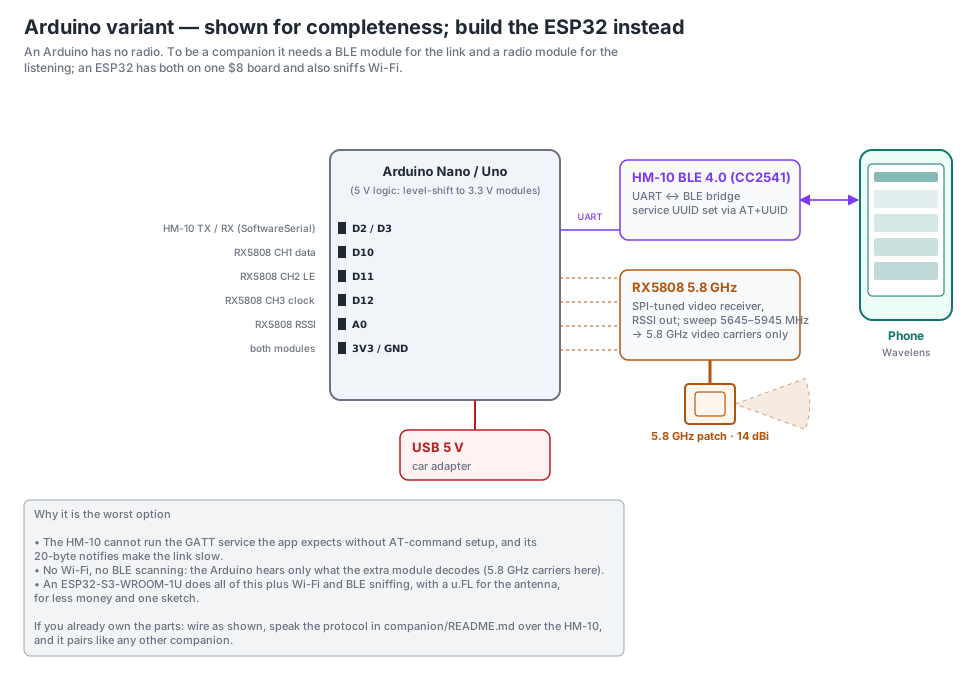
Arduino
Shown so nobody wastes an evening: an Arduino has no radio, so it needs an HM-10 for Bluetooth and a radio module for listening, and it still can't sniff Wi-Fi or Bluetooth. An ESP32 does all of it for less. If you already own the parts, the wiring is below and it pairs like any other companion.
Protocol and code
Everything is in the companion folder on GitHub: the line protocol (newline-delimited JSON over one BLE service), the ESP32 sketch with its PlatformIO config, the Pi bridge with rtl_433, hackrf_sweep, rtl_power, dump1090 and Kismet feeds, and these diagrams. Anything that can act as a Bluetooth peripheral and write one JSON object per line is a companion — the protocol is a page long on purpose.
Range and warning time, simulated
A link-budget model, not a measurement: log-distance path loss, the antenna gains and receiver sensitivities stated in range_sim.py, and a radio-horizon cap. Every assumption is in the file; change the antenna or the speed and rerun it. These are median ranges with line of sight in the antenna's beam. Reliable range — nine passes in ten — is roughly half. The Rule hits table in the app is what replaces these with real numbers.
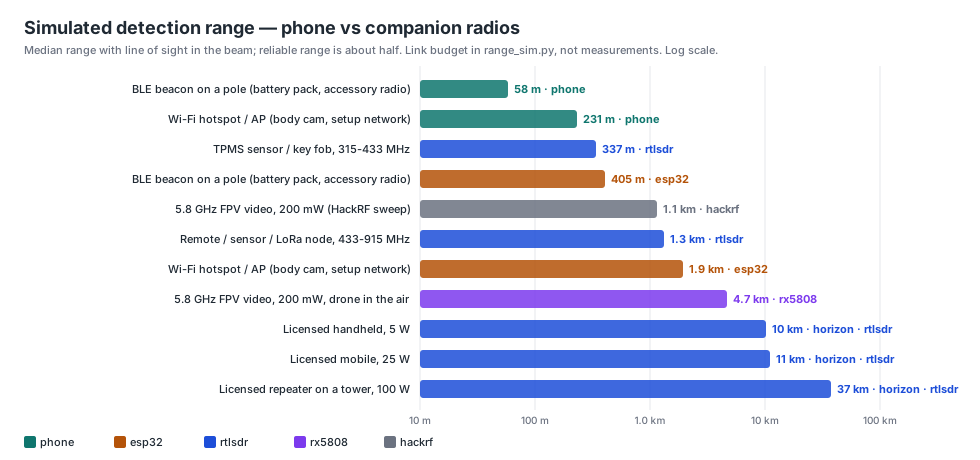
| Target | Receiver | Median range | Warning, you at 45 mph | at 70 mph | Oncoming, both at 70 |
|---|---|---|---|---|---|
| BLE beacon on a pole (battery pack, accessory radio) | phone | 58 m | 2.2 s | 1.1 s | 0.2 s |
| BLE beacon on a pole (battery pack, accessory radio) | esp32 | 405 m | 19 s | 12 s | 5.6 s |
| Wi-Fi hotspot / AP (body cam, setup network) | phone | 231 m | 11 s | 6.7 s | 3.0 s |
| Wi-Fi hotspot / AP (body cam, setup network) | esp32 | 1.9 km | 96 s | 61 s | 30 s |
| TPMS sensor / key fob, 315-433 MHz | rtlsdr | 337 m | 16 s | 10.0 s | 4.6 s |
| Remote / sensor / LoRa node, 433-915 MHz | rtlsdr | 1.3 km | 65 s | 41 s | 20 s |
| 5.8 GHz FPV video, 200 mW, drone in the air | rx5808 | 4.7 km | 232 s | 149 s | 74 s |
| 5.8 GHz FPV video, 200 mW (HackRF sweep) | hackrf | 1.1 km | 55 s | 35 s | 16 s |
| Licensed handheld, 5 W | rtlsdr | 10 km (horizon) | regional — not a warning | ||
| Licensed mobile, 25 W | rtlsdr | 11 km (horizon) | regional — not a warning | ||
| Licensed repeater on a tower, 100 W | rtlsdr | 37 km (horizon) | regional — not a warning |
In one line: a companion with a directional antenna turns a fixed pole from “alert as you pass it” into “alert a block or two ahead,” and makes sub-GHz and 5.8 GHz audible at all. It does not rescue the oncoming-at-highway-speed case; nothing that has to hear the device first can. Road mode (first-packet alerts while charging and moving) gives back the seconds the app used to spend waiting for a second packet.
Keeping it up to date: free, for life
Every companion, bought or built, updates from the same public repo, and the app never needs a network permission for it. One version number (a date, like 2026.11.03) covers the Pi bridge, the ESP32 firmware and the copy of that firmware the app carries, and the Companion screen shows it next to the radio's name.
- Spotter (ESP32), from the phone. When the app carries a newer firmware for the Spotter's chip than the Spotter reports, More → Companion radio shows Update firmware (the app carries a build for each supported chip: classic ESP32, S3, C3, C6 and C5). About a minute over Bluetooth; the board verifies the image, reboots into it and reconnects by itself. Two firmware slots, so an interrupted update leaves the old one running. From a computer instead: the browser flasher (Chrome or Edge, USB; it reads the chip and installs the matching build), also how a blank board or a pre-November Spotter gets its first Bluetooth-updatable firmware. Or plug it into a Scanner and use the admin page, which also picks the build for the board's chip.
- Raspberry Pi (Full Spectrum or your own build), by itself.
wavelens-updateon the Pi fetches, installs, restarts and checks that the bridge came back — and rolls back on its own if it didn't: a new version must load on the Pi and stay up before it counts, and if it doesn't, the last version that worked goes back and the phone and admin page say so. If the scanner software ever stops for another reason, the admin page's Status tab says what's wrong in plain words and offers the fix as a button. Run it from the phone (Check for updates / Install update / Roll back on the Companion screen), from the admin page athttp://wavelens.local:8080, nightly by a timer if you switch that on, or at the console. Settings and RadioReference packs are never touched.
Details, including what to do with a radio from before today: companion/UPDATES.md. The Pi's admin page (Wi-Fi, logs, settings, updates, flashing a Spotter, power, behind a password on your LAN): companion/pi/ADMIN.md.
What a companion doesn't fix
The physics in Does it work?. A directional antenna adds gain where it points and loses it everywhere else. It makes a fixed pole audible from further out and a device riding with you audible all the time; it does not keep an oncoming car at highway speed in range any longer. A companion makes Wavelens hear more and hear it sooner. It is not a shield, and we don't sell it as one.
Hear more, sooner
Pick the tier that matches your car: Spotter for Wi-Fi and Bluetooth at range; Full Spectrum for all of it at once, from tyre sensors and public-safety radio below 1 GHz to Wi-Fi and Bluetooth. Or start with the free Android beta, and add a radio later.
Buy one ready to go Join the free Android beta
Set up for your area · tested before it ships · free updates for life · free shipping in the US