Wavelens Android & iPhone

Works anywhere in the world · follow your local laws

Android app on Google Play · iPhone & iPad beta

Hears what's watching you.

Finds the tracker someone slipped into your bag. Warns you about a plate reader before you reach it. Spots the drone overhead, and where its pilot is standing. Notices the car that keeps turning up behind you. Add a $64 radio on the dash and hear it a block sooner. Add Full Spectrum and hear tyre sensors, remotes and public-safety radio too. Listens to everything. Sends nothing. Keeps it all on your phone.

Every Bluetooth, Wi-Fi and cellular emitter around your car, home or backpack, matched on the phone against 282 signatures and 150,000 mapped plate readers, with nothing sent anywhere. It says what it found, how sure it is, and why.

Which phone do you have?

Not sure it will run on yours? Supported phones and the best ones for it.

Or hear it a block sooner: Spotter $64 · Full Spectrum $499

Free Android beta now · $8.99, once, on Google Play at launch · Android 8.0 and up · iPhone & iPad: free, with a Spotter · no account · no network permission

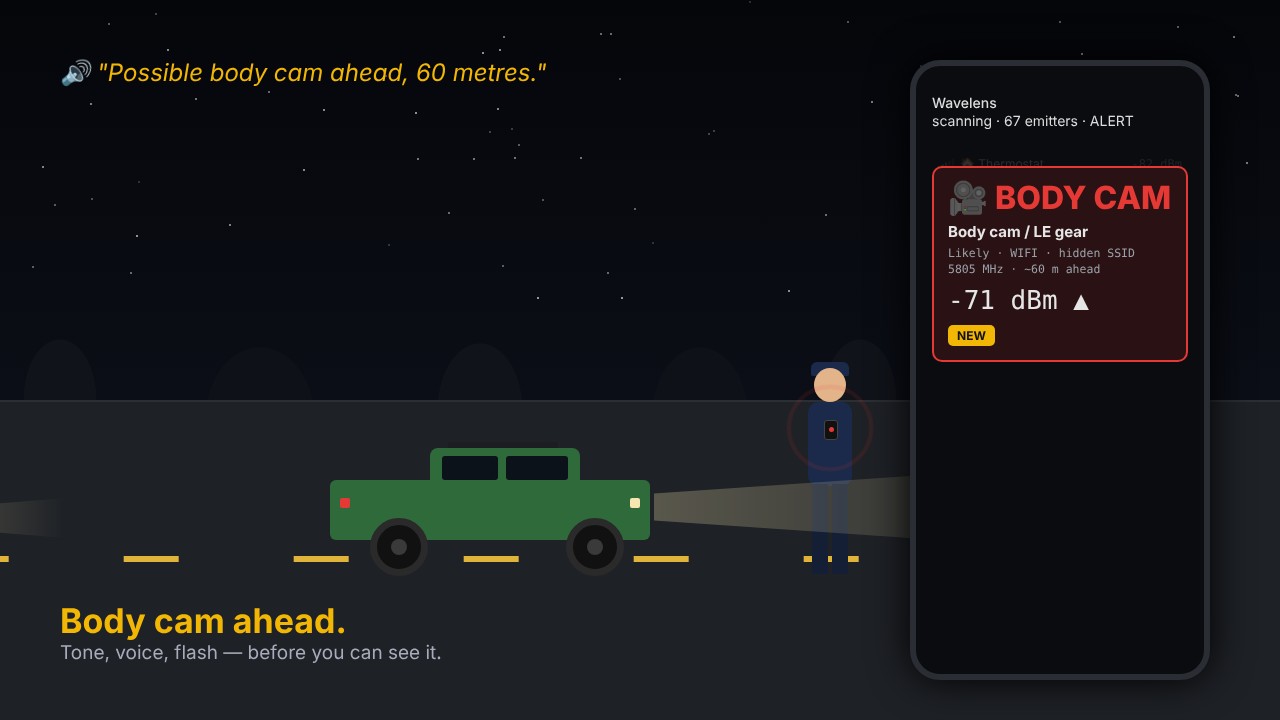
Wavelens alerting the driver to a body cam ahead

Pick your phone

Wavelens works differently on Android and on Apple devices, because Apple keeps Wi-Fi and Bluetooth details away from apps. Choose yours to see what it needs and which devices work best.

Android

Free beta now · $8.99 once on Google Play at launch

The phone listens on its own. Add a radio only if you want to hear further.

Minimum
Android 8.0 (Oreo) or newer, with Bluetooth Low Energy and GPS. Nearly every phone sold since 2017.
Best
Android 13 or newer. From 13 on, scanning keeps running with the screen off, which matters on a drive. A recent Pixel or Samsung Galaxy (S22 or newer) is ideal; we test daily on a Galaxy S26.
Works less well
Phones that aggressively kill background apps. On Samsung, set Wavelens’s battery to Unrestricted; the app tells you when it needs this.
Has everything
Live list, alerts, tails (“following you”), 150,000 mapped plate readers, trips, exports, and the Scanner with a companion radio.

Join the free Android beta

iPhone & iPad

Free · beta on TestFlight now, App Store after

Needs a companion radio to listen through: a Spotter ($64) or any ESP32 you flash with the free firmware.

Minimum
iOS or iPadOS 17 or newer. That is iPhone XS, XR, SE (2nd gen) or later, and iPad (6th gen), iPad mini (5th gen), iPad Air (3rd gen), iPad Pro (2018) or later.
Best
Any iPhone, or a cellular iPad. They have GPS, so every hit lands in the right place on the map.
Works less well
A Wi-Fi-only iPad has no GPS and guesses its position from Wi-Fi, which is poor in a moving car. Fine at home.
In the beta
Live list, device details with how sure each match is, alerts, and a map of the drive. Tails, mapped plate readers, trips, exports and the Scanner are Android-only for now.

Join the iOS beta Get a Spotter

What it finds

Every Bluetooth, Wi-Fi and cellular emitter in range is matched against a built-in signature list of 282 rules (as of 31 October), cross-checked against the IEEE and Bluetooth SIG registries, and sorted by how much you probably care. The app says how sure it is, and it is only Confirmed when the device describes itself — a vendor prefix alone never gets past Likely. How well it works is measured, not asserted.

🏷

Item trackers

AirTag, Tile, Chipolo, SmartTag and the rest. Told apart from your own, and from a lost one.

Certain

What it is. A small Bluetooth tag made to find lost items: keys, luggage, bikes, pets. It has no GPS of its own; it is located by the phones of passers-by that hear it and relay its position to the owner through a crowd-sourced network.

How Wavelens finds it. BLE advertisement manufacturer ID and payload layout for the Find My, Find My Device and Samsung networks, Tile and others; the status bytes that say whether the owner is nearby; and address type (rotating addresses are typical).

What it can't do. It cannot record audio or video, and it cannot see you. A tag with its owner nearby is just someone's keys.

Everything about item trackers

📷

Plate readers

Fixed poles, trailers and vehicle-mounted units, found by the makers' radios, plus the community map of 150,000 cameras built into the app.

Likely

What it is. A fixed camera that photographs passing vehicles and reads their licence plates, often alongside attributes such as colour, make, body type and distinguishing marks. Solar-powered pole-mounted units are common; some are mounted on existing infrastructure.

How Wavelens finds it. Wi-Fi SSID and BSSID vendor prefix patterns, and BLE advertisement names or manufacturer IDs, that match signatures published by the community. Many units expose a short-range Wi-Fi or Bluetooth link for installation and diagnostics.

What it can't do. Typically not designed to read faces or identify people directly. It does not interact with your phone; the radio you hear is the camera's own uplink or maintenance link.

Everything about plate readers

🎥

Body cams

Worn cameras with a Wi-Fi or Bluetooth radio. Wavelens says "this maker's hardware", not "an officer".

Likely

What it is. A body-worn camera or related field equipment. Body cams are small chest or shoulder units that record video and audio when the wearer activates them.

How Wavelens finds it. BLE advertisement names and manufacturer company IDs, and Wi-Fi SSID/BSSID vendor prefixes, that match public signatures for known camera makers. Names that mark transit or fleet kit are classified as cameras instead.

What it can't do. Most record only when activated, not continuously. Hearing the radio does not mean it is recording; the Bluetooth link is usually for pairing with a phone app, a vehicle system or a holster sensor.

Everything about body cams

🚁

Drones

Any aircraft broadcasting Remote ID, decoded in full: altitude, speed, heading, and where the operator is standing.

Certain

What it is. An unmanned aircraft, or its controller, broadcasting Remote ID: a standard beacon that carries the aircraft's identity, position, altitude and often the operator's location.

How Wavelens finds it. ASTM F3411 Remote ID messages decoded from Bluetooth advertisements (legacy and long-range extended) and Wi-Fi beacons — plus Wi-Fi Aware (NAN) when you turn it on under Setup → Radios: UAS ID, aircraft type, position, altitude, speed, heading and operator location, accumulated across packets. A frame that arrives cut off still marks the drone, as a partial frame.

What it can't do. The beacon cannot see you; it is the drone telling the world where it is. A drone without Remote ID is not detected by this method.

Everything about drones

📱

Following you

A phone, tag or car that keeps pace through turns, or reappears behind you. A verdict, not a device type.

Measured

What it is. A verdict, not a device type. Wavelens has heard the same emitter at several well-separated places over a span of time, lost it for a while, and then heard it again. That pattern is unusual for scenery and for a car that merely shares the road.

How Wavelens finds it. Nothing is listed until the device has stayed with you for more than 5 km of driving: a doorbell or a neighbour's phone heard for hours beside a parked car never qualifies. Then: heard at five or more positions well apart over at least twelve minutes, with at least one drop-out of a few minutes before it returned. The drop-out is what separates a tail from the car in the next lane. Needs location to be on. Tails come with a map replay of your path against the device's hits and gaps.

What it can't do. It cannot tell intent. A friend driving behind you, a delivery van on the same street, or your own earbuds in a coat pocket all produce the same pattern.

Everything about following you

🎙

Acoustic sensors

Gunshot detection and noise monitoring arrays on poles and rooftops.

Likely

What it is. A fixed microphone array that listens for impulsive sounds, usually gunshots, or for noise levels, and reports events to an operator with a position estimate.

How Wavelens finds it. Wi-Fi SSID/BSSID vendor prefixes and BLE advertisement signatures that match public signature data for known sensor hardware.

What it can't do. Generally not designed to capture or transcribe conversation; typical placement is high on poles and rooftops. It does not interact with your phone.

Everything about acoustic sensors

Tap a kind to expand it. All kinds, one page each.

The full list, with how sure it is and why, including what a companion radio adds
KindExamplesHow sure
🏷Item trackersAirTag, Tile, Chipolo, Pebblebee, SmartTag, Find My Device tagsCertain. Find My and FMDN frames and the DULT unwanted-tracker service describe themselves — and say whether the tag is separated from its owner
🚁DronesAny aircraft broadcasting Remote ID, over Bluetooth or Wi-Fi beacons; DJI and other drone makers by their radios and Wi-Fi networksCertain for Remote ID: ASTM F3411 decoded in full — altitude, speed, heading, and where the operator is standing. A maker's radio without Remote ID is Likely
📱Devices moving with youA phone, tag or car that keeps pace through turns, or reappears behind youMeasured. Signal history against your own GPS track over minutes; tails come with a map replay
📷Plate readersFixed ALPR poles, trailer-mounted and vehicle-mounted unitsLikely. Hotspot and Bluetooth vendor prefixes used by the hardware makers — a maker, not a model
🎥Body camsWorn cameras with a Wi-Fi or Bluetooth radioLikely. Vendor prefixes and hidden-SSID hotspots; the same radios ride in docks and on buses, so it says "this maker's hardware", not "an officer"
🎙Acoustic and traffic sensorsGunshot detection, travel-time probesLikely. Vendor prefixes and advertising patterns
🛠RF toolsPentest and signal-capture hardwareLikely. Known device names and service UUIDs
🚌Fleet vehiclesBuses, ambulances, school buses, delivery and utility fleets: their telematics, dash cams and LTE routersNamed, never alerted. The same Cradlepoint or Sierra router rides in a cruiser and a city bus. Kept in its own category so a bus is a bus, and a plate-reader or body-cam hit on a vendor prefix alone can be held for a second pass at the same spot (Setup → Alerts, off by default) instead of alerting on the first packet
📡Everything elsePhones, wearables, cars, doorbells, access points, cell sitesClassified so the list above stands out — and so a phone that follows you is noticed
With a companion radio — an ESP32, a Pi with an SDR, or a carputer, feeding the app over Bluetooth
📶Hotspots, any channelBody-cam and in-car hotspots on 5 GHz, hidden-SSID setup networks, anything on the one channel you park onLikely. The companion sees every beacon on a channel instead of one sweep in forty; same vendor-prefix rules as the phone
🔧Sub-GHz devicesTPMS, garage and gate remotes, weather and door sensors, LoRa and 915 MHz telemetryLikely. Decoded by name with rtl_433 on an RTL-SDR, or a CC1101/SX1276 on the ESP32; sub-GHz is where cars and buildings talk
📺5.8 GHz video linksFPV drones, analog camera links, wireless video sendersPossible. A carrier where video lives; the RX5808 or a HackRF sweep hears it, nothing names it
🏛Licensed radio, by ownerPublic-safety dispatch, county DOT, transit, utilities, towing and taxi fleets — by name, call sign and distance to their siteLikely. From the FCC's public license records for your county; says whose radios are in range, not that one is watching you
✈️Aircraft overheadAnything transmitting ADS-B: callsign, altitude, positionCertain, unclassified. dump1090 on an RTL-SDR; an airliner is not a drone, so it's shown but never alerted
📈Any carrier to 6 GHz1.2 GHz links, 900 MHz ISM, 433 and 315 MHz bursts, anything else that stands out of the noisePossible. HackRF sweeps report energy by band — "something is transmitting here", labelled honestly, never a name without a licence record behind it
-48
Body cam / security gear
Likely · hidden SSID · 5805 MHz · ~3 m
-61
Item tracker
Find My · separated from owner · with you 4 min
-74
Drone / UAS
Remote ID · alt 62 m · operator 340 m NE
-88
ALPR / fixed camera
Known fixed · heard here in 6 sessions

Find out what's within range of your car tonight

Install it, leave the phone on the dash for one drive, and read the list. Put your own AirTag or Tile in the glovebox first: it should be named, marked separated, and alerted, with the reason shown.

Join the free Android beta How well it works, in numbers

282 signatures · 150,000 mapped plate readers · Confirmed only when the device describes itself

Alerts while you drive

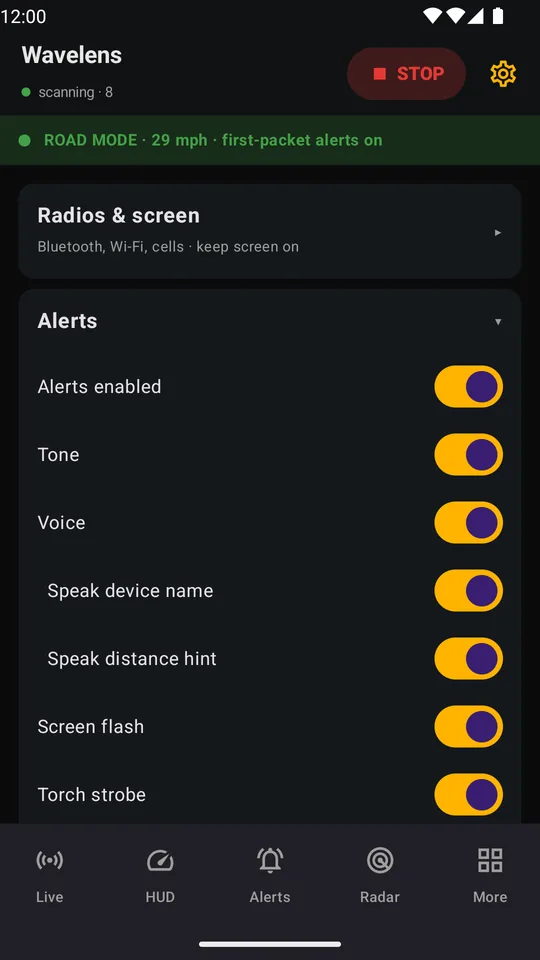
Phone on the dash, screen off. A distinct tone for each kind, the maker and distance spoken aloud (“Axon body cam, close”), a screen flash, the torch, a buzz — each one a toggle — routed to the handset speaker if you'd rather the car's audio didn't swallow it.

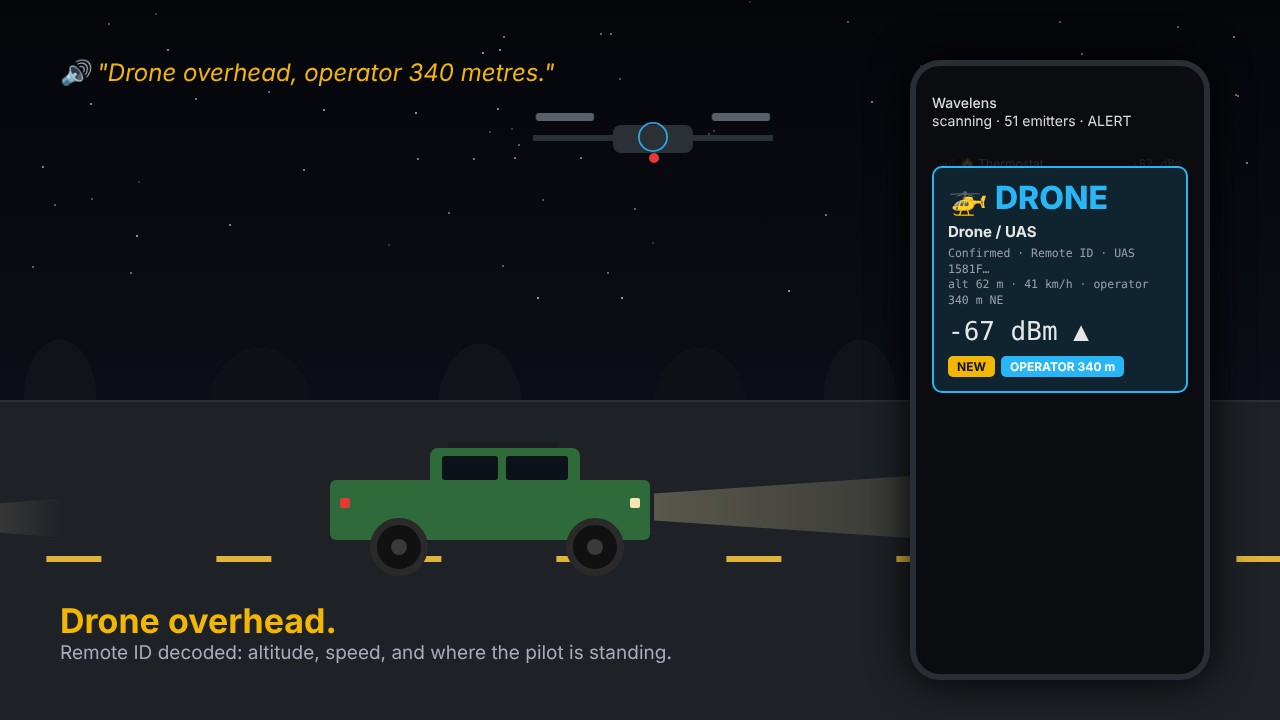
Drone alert showing altitude, speed and operator distance

Drone overhead

Remote ID decoded: altitude, speed, and where the pilot is standing.

Body cam alert at -71 dBm

Body cam ahead

Tone, voice and flash before you can see it.

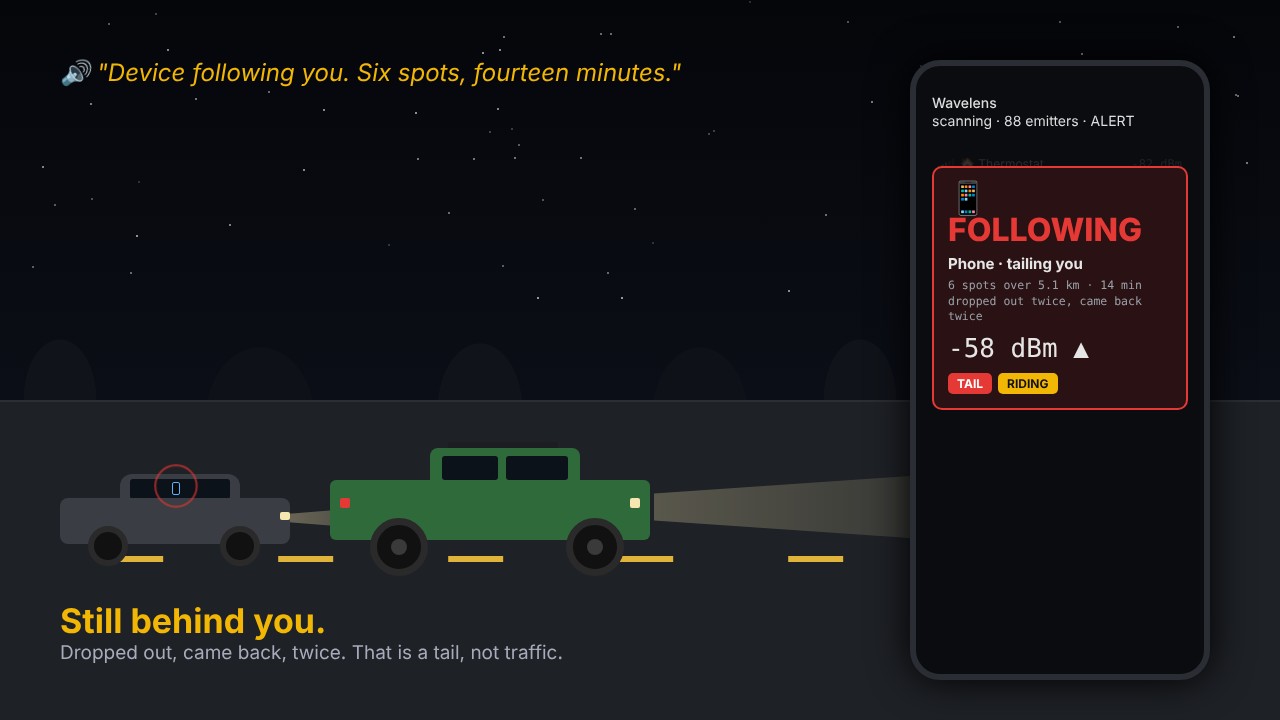
Following alert: six spots over 5.1 km, dropped out twice

Still behind you

Dropped out, came back, twice. That's a tail, not traffic.

Hear the alerts on your own commute

Everyone who joins the Android beta before the Play Store launch gets the Play version free with a promo code. Screen off, phone on the dash: it speaks when something matters and stays quiet when nothing does.

Join the free Android beta See every screen

Tone, voice, flash and buzz, each its own switch · routed to the handset speaker if you want · no network permission

Built for the road, not the lab

Riding with you

A device that holds a steady signal while you cover ground is in or on your vehicle. Wavelens scores every emitter against your own GPS motion and alerts when one keeps pace through turns and stop-and-go — traffic jams and parking don't count.

Following you

Heard at five well-separated spots over twelve minutes, and lost for at least three minutes in between: the car in the next lane never leaves range, so it never qualifies. Tails come with a map replay of your path against the device's hits and gaps, and the evidence is saved to disk the moment it happens.

Trackers that matter

Find My frames come from AirPods and powered-off iPhones as well as AirTags, so a tracker alerts only when it's separated from its owner and has stayed with you — or is riding or following.

Road mode

Plugged in and moving faster than 15 mph, the app stops waiting for a second packet: plate readers, body cams, sensors and drones alert on the very first one, however faint, because at road speed that faint packet is often the only one you get. A green ROAD MODE strip on every tab says it's on.

A second look before it shouts

A hardware hit that rests on a vendor prefix alone, at a spot you've never passed, gets one soft tick instead of a siren. It alerts in full when the same thing is heard there again, or after you've stopped nearby for two minutes — so a passing bus doesn't sound like a body cam.

Radar and finder

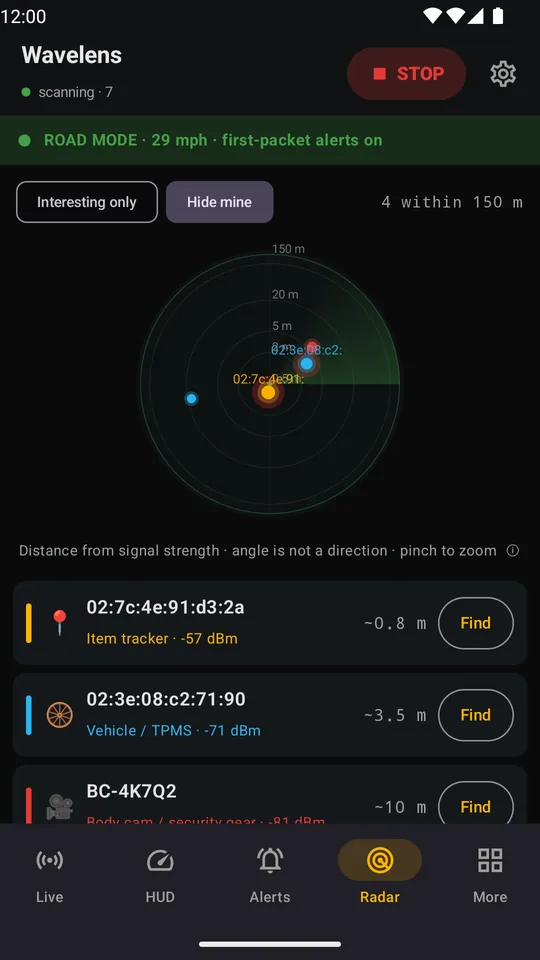
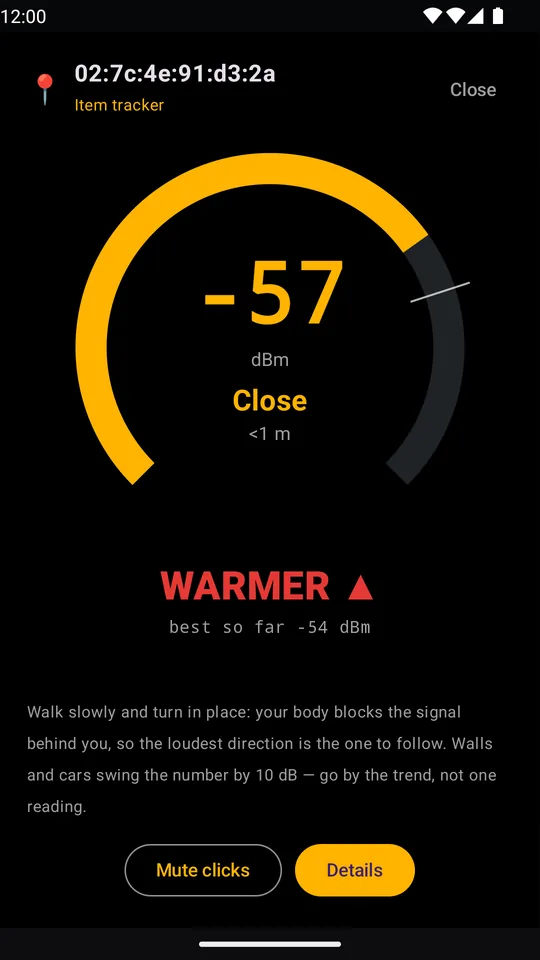
A zoomable radar puts everything heard on rings by signal strength. Pick one device and finder mode turns it into hot and cold, so you can walk the car and find the thing that's riding with you.

Your routes, learned

The app learns the roads you drive regularly and the fixed emitters along them. A new plate reader on your commute gets its own alert; the one you've passed thirty times goes quiet.

Mapped plate readers, ahead of you

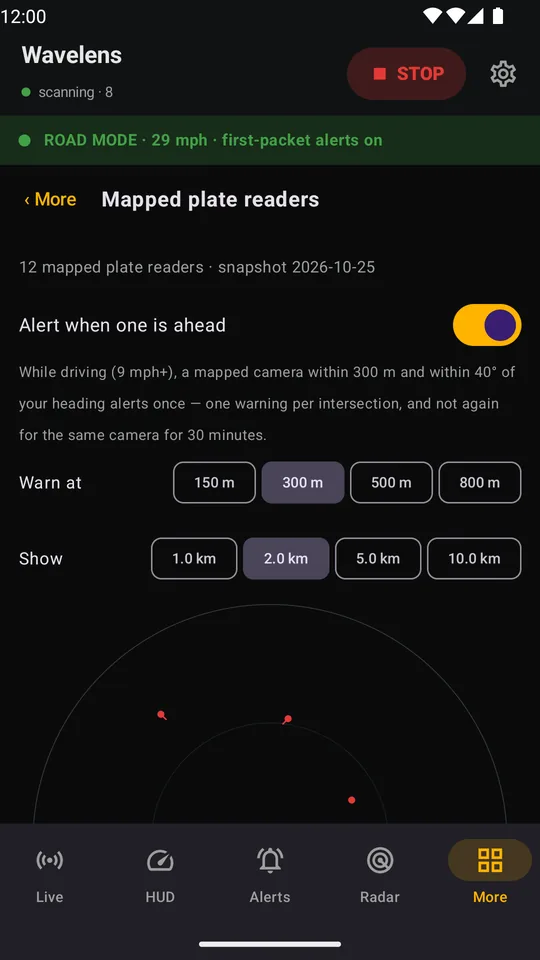
Many plate readers are silent on the radio, so Wavelens also carries the community map of them: every mapped ALPR camera — over 150,000 of them — built into the app. Driving toward one says plate reader ahead a few hundred metres out, and More → Mapped plate readers pins the ones around you. Still offline — the list ships with each update.

Flag once, recognise forever

Phones and trackers rotate their addresses every few minutes. Flag a device and Wavelens fingerprints what doesn't change, so the second time you pass the same camera it says known, not possible.

A report for every drive

Duration, distance, cameras passed, trackers heard, anything that rode or followed — exported as PDF or KML. And a plain-English card for every kind of device: what it is, who deploys it, what it can and can't see.

A map that doesn't pretend

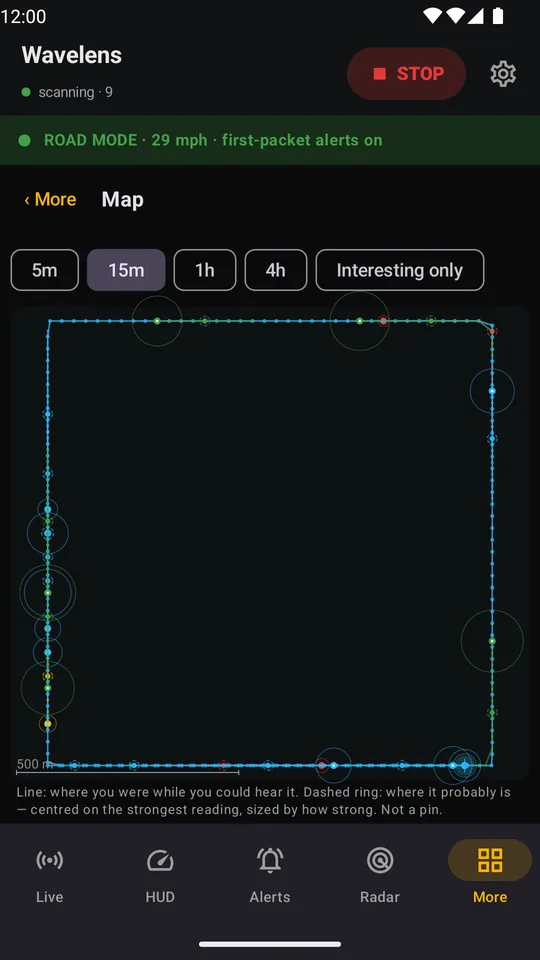
A phone knows where it was when it heard something, not where the thing is. So the map draws the stretch of road where a device was audible and a dashed ring around the strongest reading, sized by how strong it was — never a pin claiming more than the radio knows. Rule hits counts every signature that fired, per pass, so a drive produces numbers instead of anecdotes.

Add a radio of your own

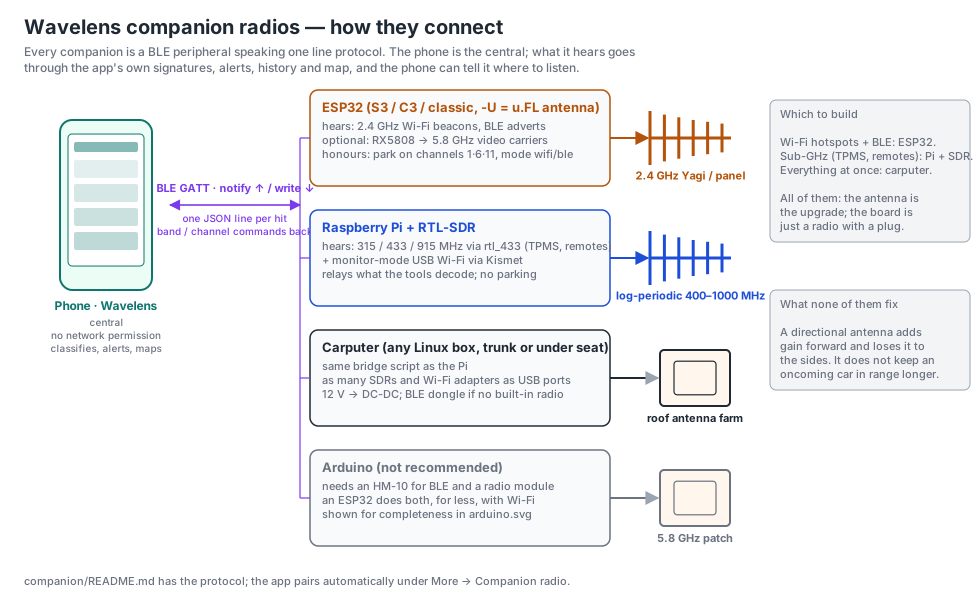
An ESP32 with a directional antenna, a Raspberry Pi with an SDR, a carputer: anything that can act as a Bluetooth peripheral and speak a one-page protocol feeds the app, and the app can tell it which channel to park on. Companion radios has the wiring, the firmware and what each one hears.

Set up for where you drive

US settings are built in. Drive somewhere else? Import a pack: a small file, made and maintained by people who drive there, with the local units, device rules and radio band names. The app still never goes online; you pick the file and import it.

What it can't hear

Anything that talks only over cellular, or doesn't transmit at all. An oncoming car at highway speed, which is usually out of range before a single packet arrives. A missing map pin doesn't mean there's no camera. Known weaknesses has the full list and the numbers so far.

Want it to hear a block sooner, and below 1 GHz?

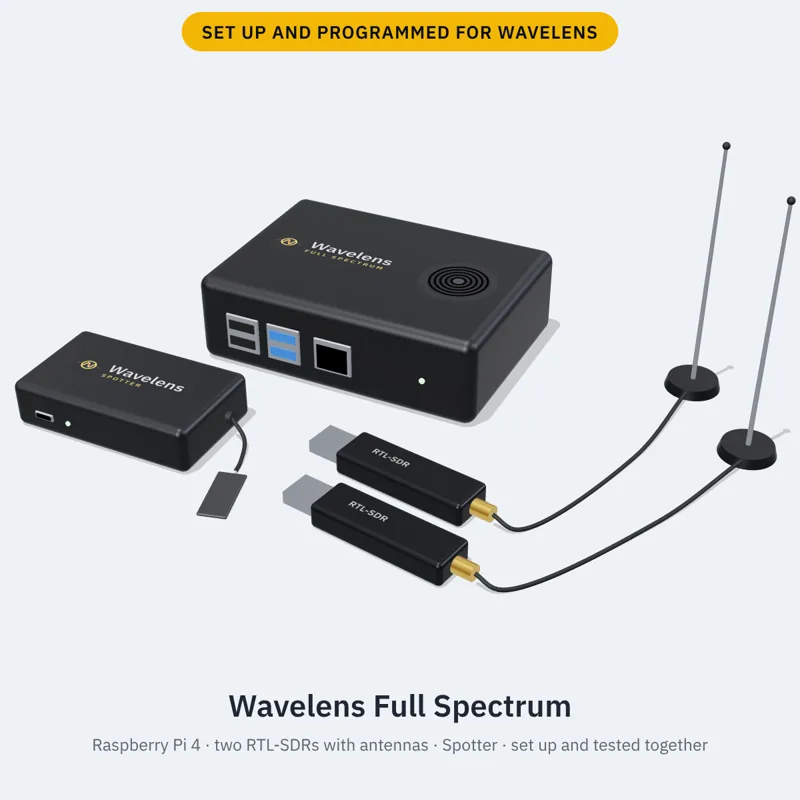
The phone is the floor, not the ceiling. Full Spectrum is the whole car covered, sub-GHz to 5 GHz: a Raspberry Pi with two RTL-SDRs for tyre sensors, remotes and P25 and DMR public-safety radio, plus a Spotter for 2.4 and 5 GHz Wi-Fi and Bluetooth, set up and tested together for $499. Just want a real antenna on the dash? Spotter, $64.

Get Full Spectrum, $499 Or a Spotter, $64

Set up for your area · tested before it ships · free shipping in the US · free updates for life

Add a companion radio

A phone can't pick its Wi-Fi channel, can't hear 433 MHz or 5.8 GHz, and has an antenna the size of a paperclip. A companion is a second radio with a real antenna — in your car, at home, or in a backpack — that listens for the app and hands everything it hears over Bluetooth. Wavelens treats it like its own: same signatures, alerts, history and map.

Overview: the phone running Wavelens linked over Bluetooth to companion radios — an ESP32, a Raspberry Pi with an RTL-SDR, and a carputer — each with a directional antenna

ESP32 · build it for $10–30, or Spotter, ready to go, $64

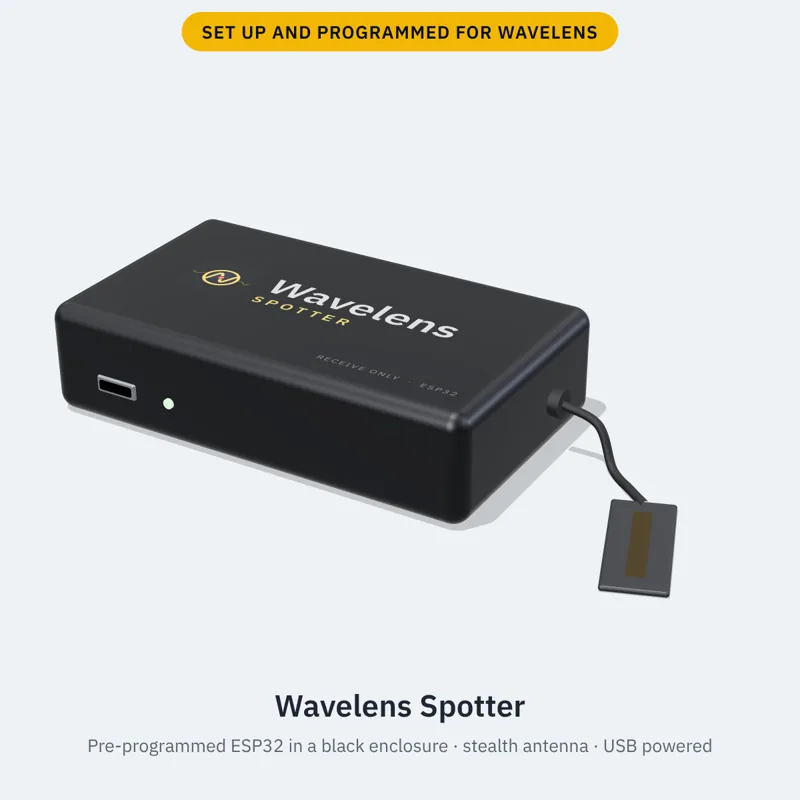
One board, one sketch, a 2.4 GHz directional antenna. Hears Wi-Fi hotspots and Bluetooth from much further than a phone, and parks on the channels you choose. Add-on modules hear 5.8 GHz video and 433/315 MHz. Spotter is this build on a dual-band ESP32-C5 (2.4 and 5 GHz), already flashed, in a black enclosure with the antenna fitted, and set up for your area.

Raspberry Pi + RTL-SDR · build it for $60–120, or Full Spectrum, ready to go, $499

Decodes tire-pressure sensors, key fobs, remotes and wireless sensors by name — each with its own ID, so a car that keeps turning up near you is noticed — and sweeps 900 MHz, 1.2 GHz links and the GPS band for anything that shouldn't be there. The Full Spectrum kit is this Pi with the bridge and the digital-voice decoder installed, two RTL-SDRs and a Spotter, tested together.

HackRF or a carputer · build only

Sweeps from 1 MHz to 6 GHz, or runs several radios at once, one per USB port. We don't sell these; a Full Spectrum kit takes a HackRF on a spare USB port. Energy, honestly labelled: “something is transmitting here”, never a name the radio can't back up.

Same privacy as the phone

The link is Bluetooth only, the app still has no network permission, and nothing the companion hears leaves your phone. Receive-only: nothing in the guide transmits. The firmware, the Pi bridge and the one-page protocol are open on GitHub.

Buy one ready to go Or build it yourself with the free guide

The firmware, the Pi bridge and the protocol are open on GitHub. Every command in the guide is copied from a Pi we run.

Buy one ready to go

Rather not build it? Each one is programmed, set up for the area you give at checkout and tested before it ships. Plug it in, tap Find and Pair, and it's listening. Free shipping in the US, free updates for life, and the build guides stay free whether you buy or not.

Start here

Spotter

$64 cased, shipped free in the US

  • Pre-programmed dual-band ESP32-C5 in a black enclosure, stealth antenna on a short lead
  • Hears 2.4 and 5 GHz Wi-Fi and Bluetooth, a block further than a phone in your pocket
  • Works on its own: no Raspberry Pi or computer needed. It pairs straight to your phone over Bluetooth
  • Plug into any USB port, pair once, updates over Bluetooth

Read all about it

Order Spotter (US) Outside the US ($89)
Recommended Only 3 left

The one to get

Full Spectrum

$499 the whole car, sub-GHz to 5 GHz

  • Pre-programmed Raspberry Pi 4, two RTL-SDRs with antennas and 6-inch USB extensions, and a Spotter
  • Tyre sensors, remotes, and P25 / DMR trunked public-safety radio (unencrypted only), plus 2.4 and 5 GHz Wi-Fi and Bluetooth
  • Set up and tested together: phone, Pi and ESP32 listen at once

Read all about it

Order Full Spectrum (US) Outside the US ($524)

Want more than one thing? Build a cart → A kit, extra Spotters or RTL-SDRs and cases in one checkout, one shipping charge.

Extras: RTL-SDR with mag-mount antenna, $40 each, for a Pi you already have (we recommend two, one per job): order (US) · outside the US, $65 with shipping.

Add-ons at checkout: a protective case for what you buy (Pi with heatsinks and fan $25, RTL-SDR sleeve $12; the Spotter comes cased), or the full case set with a hard carry case for the kit, $99; longer USB extension cables 1 m $8, 2 m $10, 3 m $12 (Full Spectrum includes two 6-inch ones). The directional Yagi ($59) and the car roof antenna kit ($49) are Sold out for now; every RTL-SDR still ships with its own antenna. Free shipping in the US, $25 flat everywhere else. Receive only: they listen and talk only to your phone. Follow the laws where you drive. All the details.

Screens

Screenshots use synthetic demo data (invented devices on a made-up route) except the ones marked real, which have device addresses and unit IDs blurred.

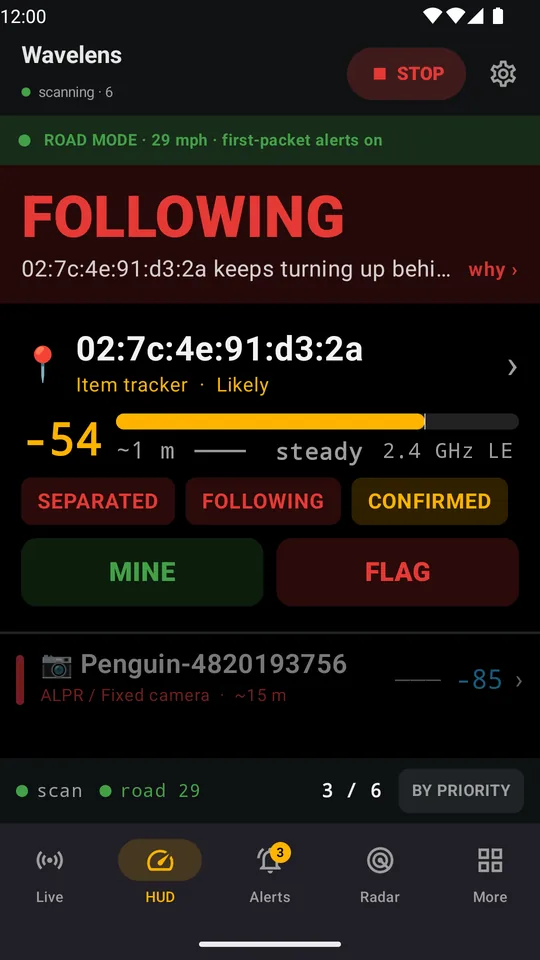
HUD showing FOLLOWING: a separated item tracker riding with you at -54 dBm, about 1 m away, with a plate reader listed below
HUD — one verdict, readable from the dash. A tag separated from its owner has kept pace with the car for miles.
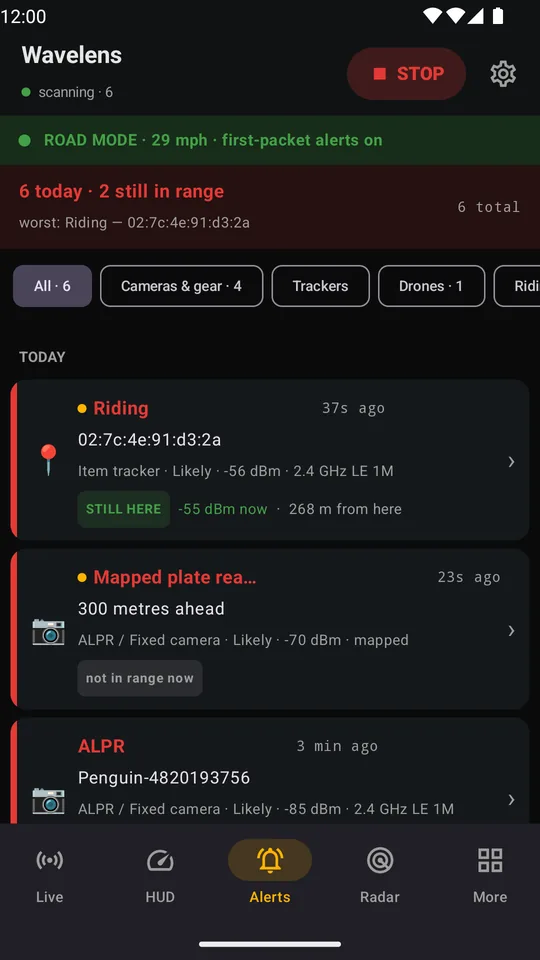
Alerts screen: a tag riding with you, a mapped plate reader 300 metres ahead and a heard plate reader, each with confidence, signal and whether it is still in range
Alerts — what fired today, worst first: how sure, how strong, and whether it is still in range.
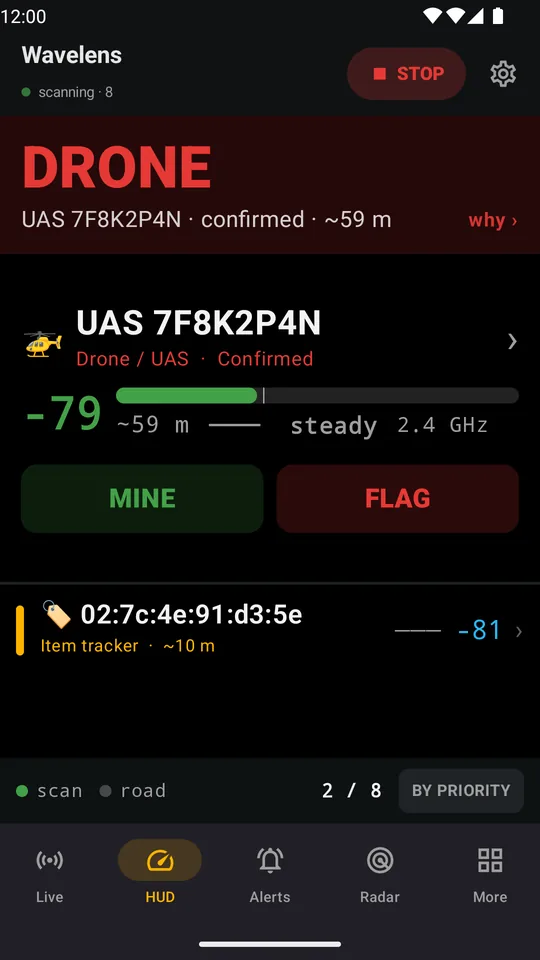
HUD showing a drone broadcasting Remote ID, confirmed, about 59 m away and closing
A drone broadcasting Remote ID, confirmed and closing. The HUD says what it is and how close.
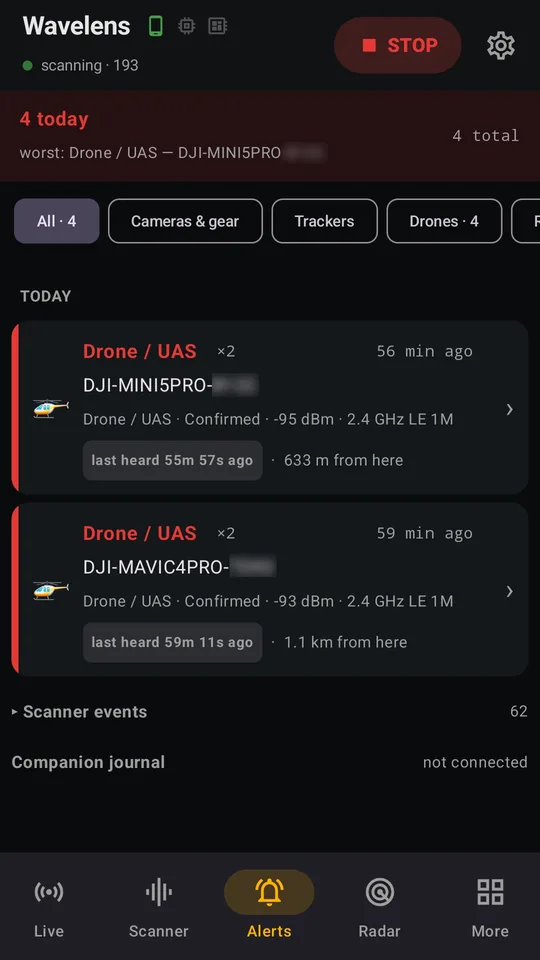
Alerts screen from a real drive: a DJI Mini 5 Pro and a DJI Mavic 4 Pro, both Confirmed, heard at -95 and -93 dBm, 633 m and 1.1 km away
From a real drive (unit IDs blurred): two DJI drones in an hour, a Mini 5 Pro and a Mavic 4 Pro, both Confirmed from their own broadcasts.
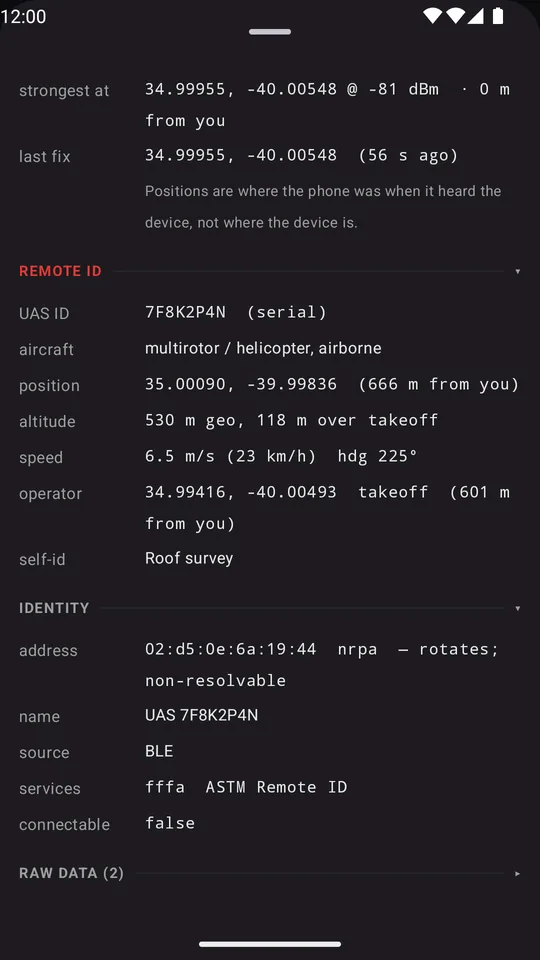
Drone device card: decoded Remote ID with serial, altitude 118 m over takeoff, 6.5 m/s, operator about 600 m from you
Remote ID decoded: altitude, speed, heading, and how far away the operator is standing.
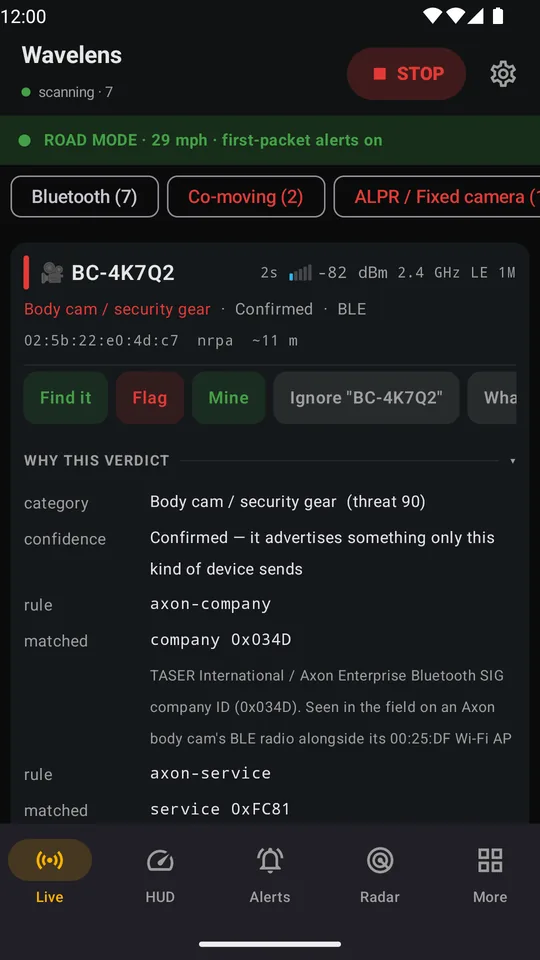
Live list filtered to Body cam / security gear, card open: confirmed by company ID 0x034D and service 0xFC81
Body cam / security gear, confirmed by the maker's registered company ID and service — every match explained.
Radar: everything heard in the last 30 s on distance rings, with a Find button per device
Radar — everything heard in the last 30 s by estimated distance. Tap one to find it.
Finder: -57 dBm, Close, WARMER, best so far -54 dBm
The finder: a smoothed gauge and warmer / colder as you walk up to it.
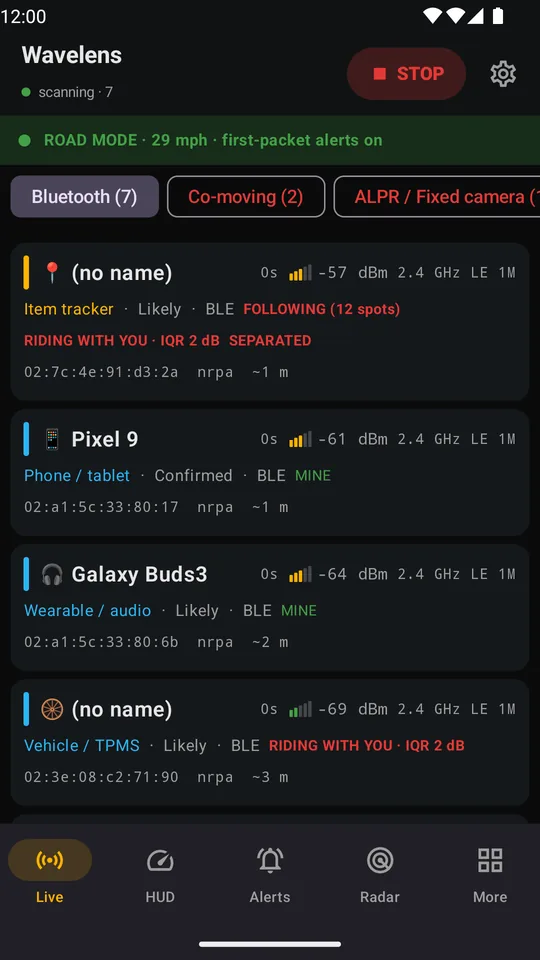
Live list: a separated tag riding and following, your own phone and earbuds marked Mine
Live — badges say what matters: SEPARATED, RIDING WITH YOU, FOLLOWING. Mark your own kit Mine once and it never alerts again.
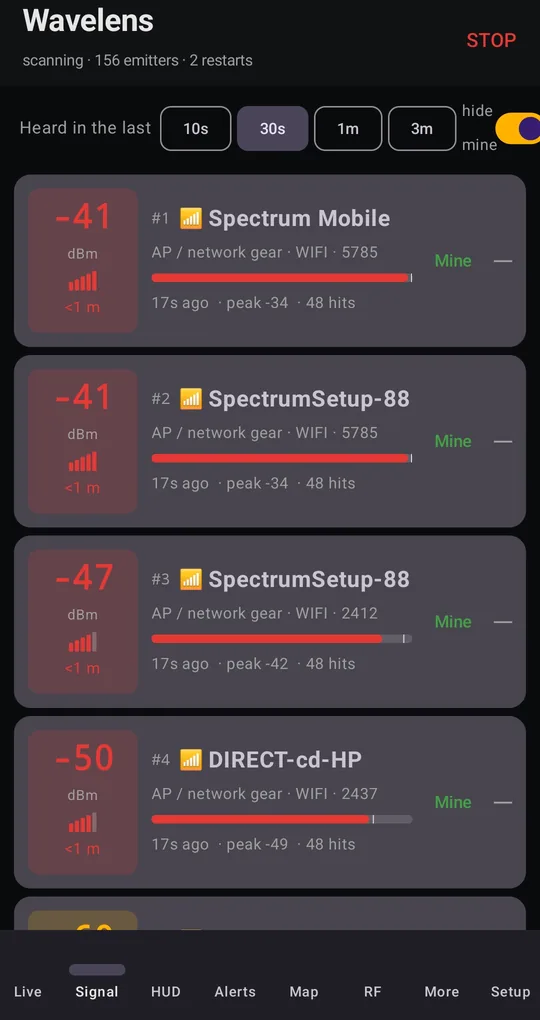
Signal list ranked by strength: the tracker first, then a TPMS sensor riding along
Signal — everything heard in the last 30 s, strongest first. Walk a car with it: the top row is the closest thing.
Map: the stretch of road where each device was audible, with a dashed ring at its strongest reading
The map draws where you were while each device was audible and a ring at its strongest reading — never a pin claiming more than the radio knows.
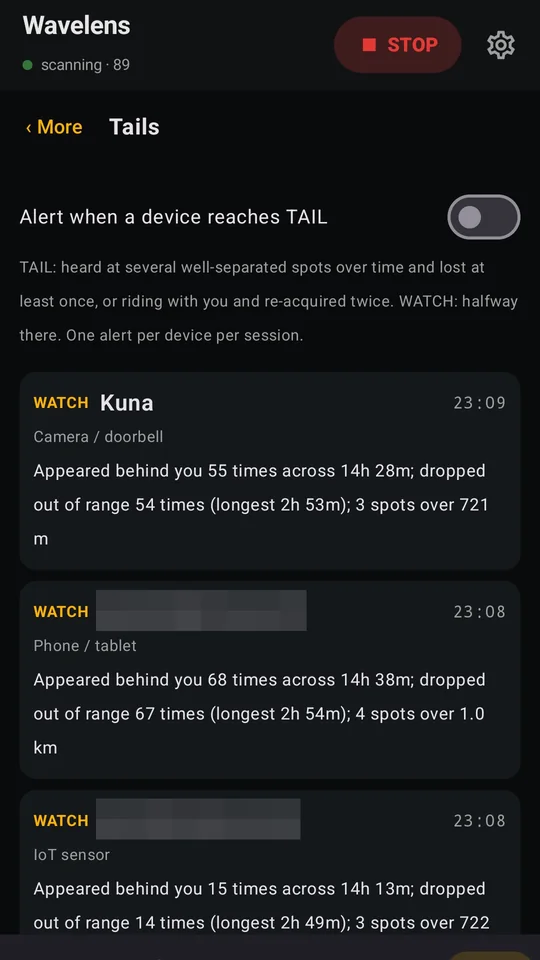
Tails screen: three devices at WATCH, each appeared behind you dozens of times across 14 hours, dropped out of range and came back, heard at three or four spots up to a kilometre apart
Tails, from a real phone (addresses blurred): WATCH is halfway to TAIL — how many times it appeared behind you, dropped out and came back, and at how many spots.
Mapped plate readers: camera pins around you, north up, with the alert-ahead switch
Mapped plate readers, offline, with a warning when one is ahead.
Setup, Alerts section: tone, voice, device name, distance hint, screen flash, torch strobe
Tone, voice, flash, strobe — each on its own switch, behind the gear.

On iPhone and iPad

The same detection on iOS, listening through a Spotter. Demo drive: invented devices on a made-up route; the street map is Apple Maps. Join the iOS beta.

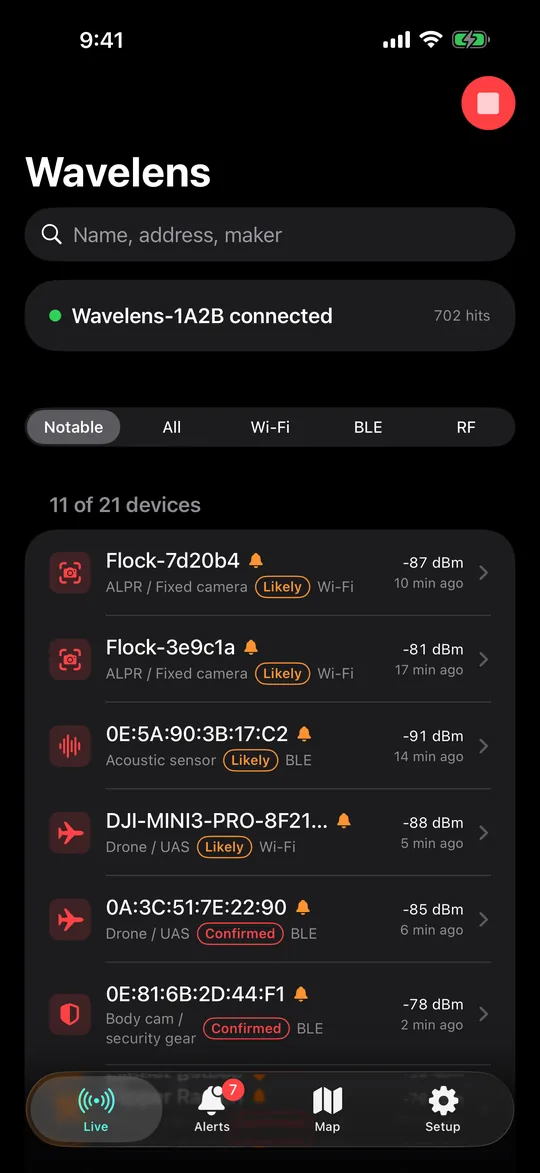
iPhone Live list: Wavelens-1A2B connected, two plate readers, an acoustic sensor, two drones and a body cam at the top, each with confidence and signal
Live on iPhone: the Spotter is connected and the notable devices rise to the top, each with how sure it is.
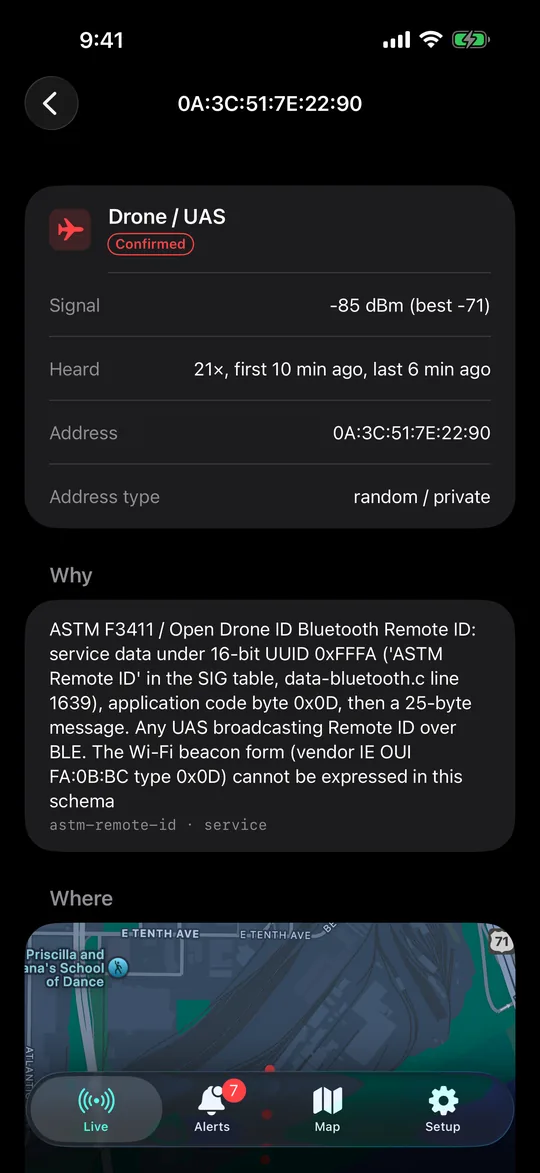
iPhone device card: Drone / UAS, Confirmed, from its ASTM F3411 Remote ID broadcast, with the rule that matched
A drone, Confirmed from its own Remote ID broadcast, and the rule that says so.
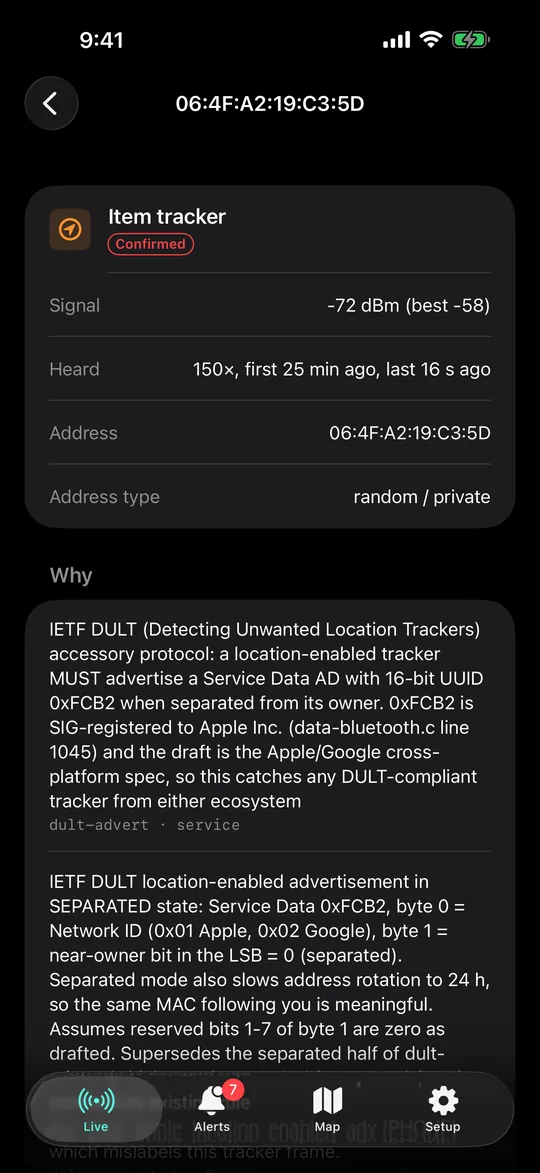
iPhone device card: item tracker, Confirmed, heard 150 times over 25 minutes, separated from its owner
A tracker separated from its owner, heard the whole drive: 150 times in 25 minutes.
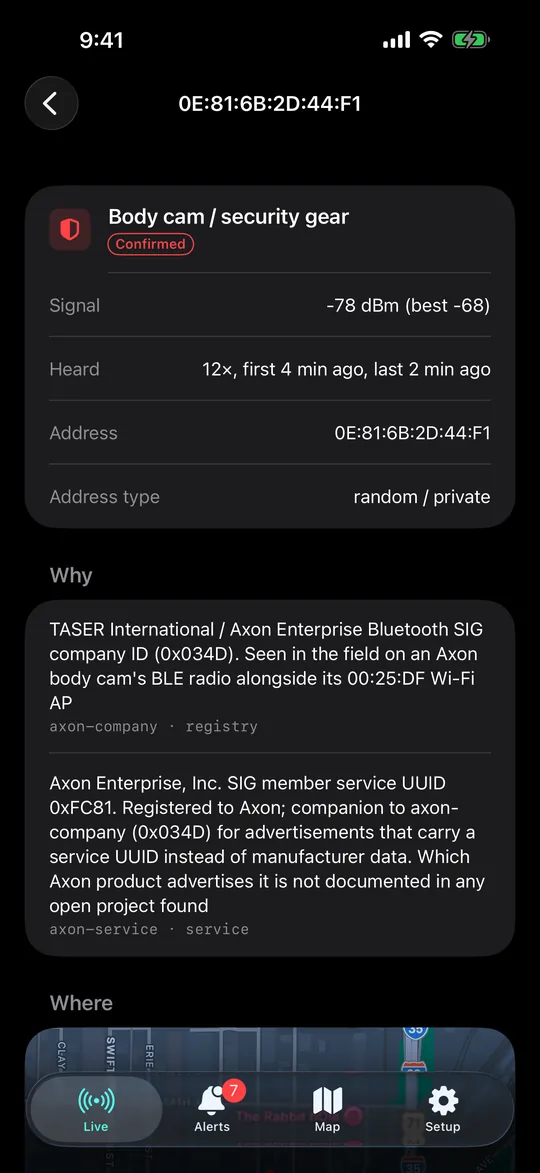
iPhone device card: body cam or security gear, Confirmed by the maker’s registered company ID and service
Body cam, confirmed by the maker’s registered company ID and service. Every match explained.
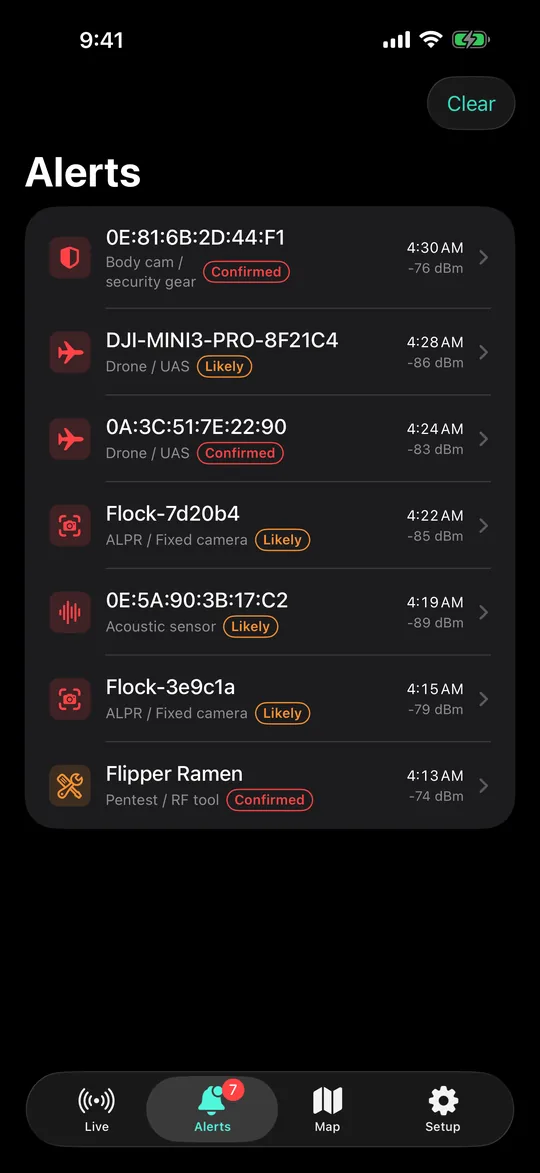
iPhone Alerts: body cam, two drones, two plate readers, an acoustic sensor and an RF tool, with times and signal
Alerts: what fired on the drive, newest first.
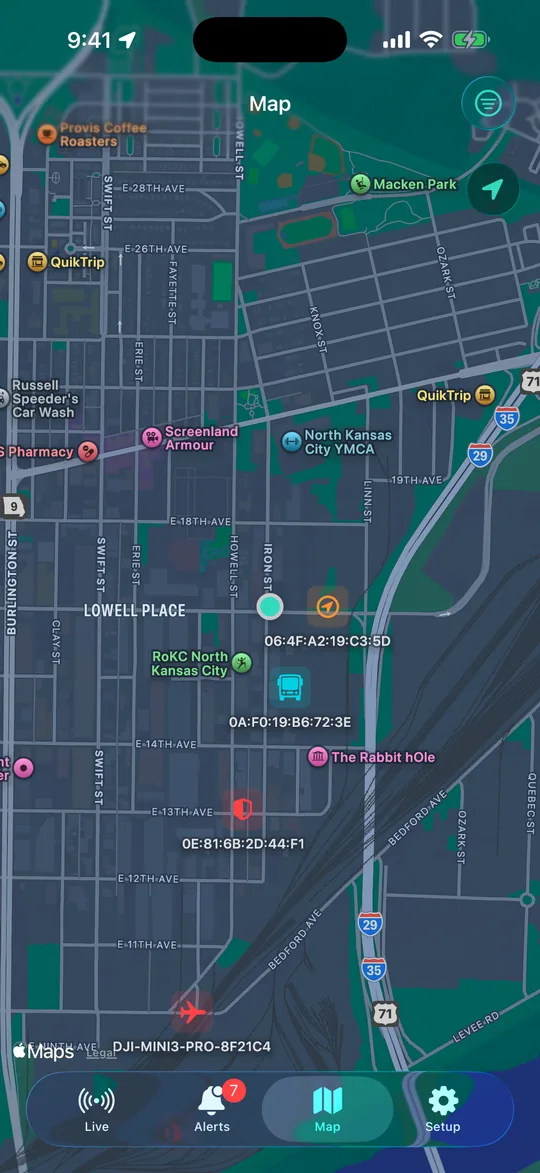
iPhone Map: notable devices placed along the drive on Apple Maps
The map: where each notable device was heard.
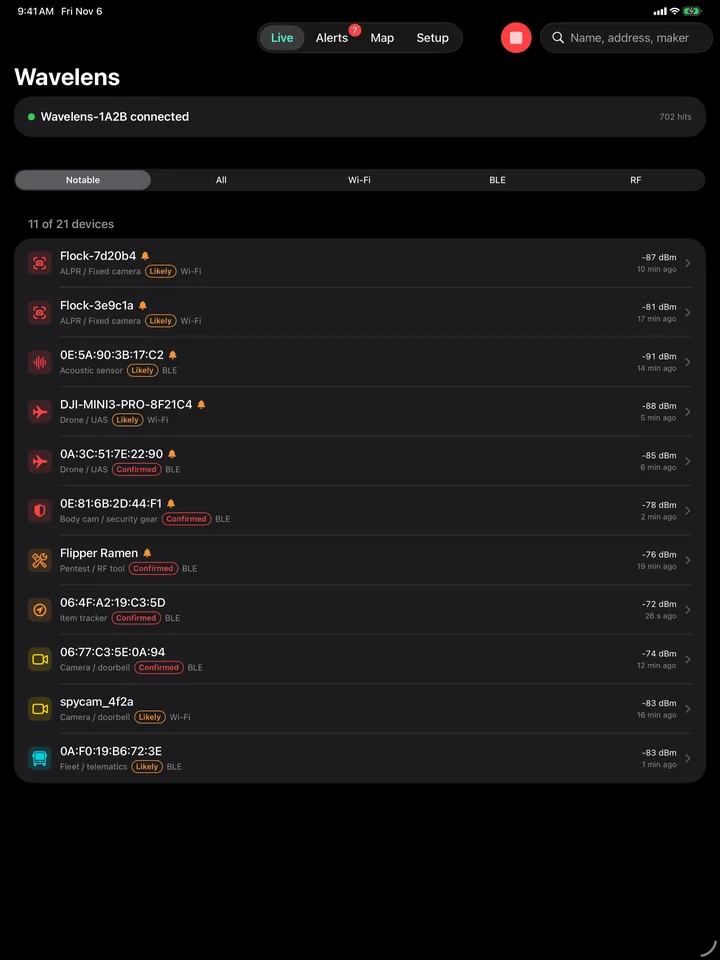
iPad Live list in portrait: the companion connected and the notable devices first
iPad: the full list, with room to read it.
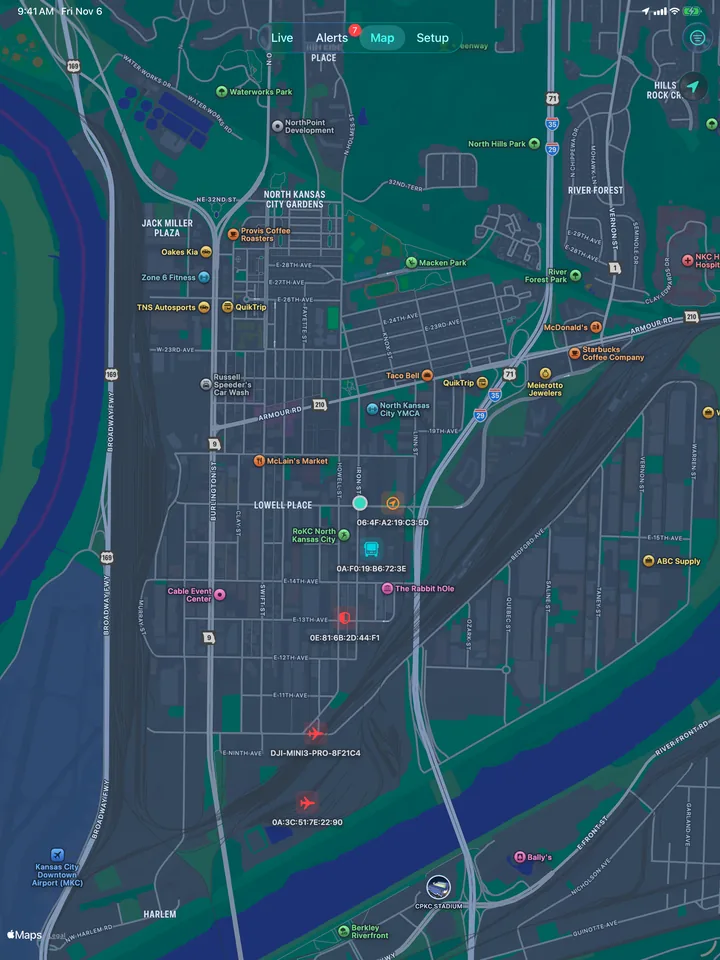
iPad Map: the drive with each notable device placed along it
iPad map of the drive.

See it on your own phone

These are demo screens. Yours will show the trackers, cameras and drones actually around you, on the roads you actually drive.

Join the free Android beta Buy a companion radio

No network permission · no account · 282 signatures · 150,000 mapped plate readers · Android 8.0+ · iPhone & iPad with a Spotter

Videos

Thirty seconds each, no jargon: what the app does, what a companion radio adds, and how little setup a pre-programmed one needs. The two permission walk-throughs we filed with Google Play are on the support page.

A real drive, recorded on the phone: body-cam radios heard, why the app thinks so, and one afternoon's alerts. Locations and device addresses blurred.
Hears what's watching you: drone, body cam, tail, and the Spotter on the dash. 30 seconds.
What a phone can't hear: the phone, then Spotter, then the Raspberry Pi with an RTL-SDR, each hearing more. 20 seconds.
Companion radios: a second radio with a real antenna, and the three ready-made tiers. The guide.
Set up for where you drive: one line at checkout, and the device arrives configured for your area. 15 seconds.
Spotter in 17 seconds: plug in a USB-C cable, Find, Pair, and the first alert.
Every screen in thirty seconds: body cams, drones, tags that follow you, the public-safety scanner.
A real companion rig: HackRF One with PortaPack, RTL-SDR and a Raspberry Pi. Set one up.

That's the whole pitch. The rest is your drive.

Seven videos can't show what's on your street. One evening with the app can. The Spotter in the last clip is $64, cased, programmed and tested.

Join the free Android beta Buy Spotter, $64

Nothing leaves your phone

  • No network permission. The app cannot make a network request — not to us, not to anyone.
  • No account, no analytics, no ads, no crash reporting. There is nothing to sign up for and nothing phoning home.
  • Listen only. Wavelens never connects to, pairs with or transmits to the devices it hears.
  • Your data stays yours. Detections, history and recordings live in the app's private storage, excluded from cloud backup, deleted when you uninstall.
  • Sharing is yours to choose. The only way anything leaves is a file you export or a diagnostics report you read in full and send yourself.
  • Read the full privacy policy

Nothing to sign up for, nothing to trust us with

The policy is short because there is nothing to disclose: the app has no way to reach the internet. Read it, then install it.

Join the free Android beta Read the policy

No network permission means it cannot phone home even if we wanted it to · no account · no analytics · no crash reporting

Join the beta

Both apps are in beta right now, and both betas are free. The Android app is in Google’s final review for the Play Store; the iPhone and iPad app is on Apple’s TestFlight and will stay free on the App Store.

On Android? Wavelens is in Google’s final review for the Play Store. Until it is approved, you can join the closed beta: email us the Google account on your phone (the one signed into the Play Store) and we’ll send an opt-in link. Everyone who joins the Android beta before the Play Store launch gets the Play version free with a promo code.

Join the free Android beta by email

wavelensapp@gmail.com · subject “Wavelens beta tester”

  • Android 8.0 or newer, with a personal Google account (work accounts usually can’t join Play tests).
  • What helps most: real drives, false alarms as a Flagged screenshot, misses you know about, and a diagnostics report when it feels off — the full list.

On iPhone or iPad? The iOS app is in beta through Apple’s TestFlight, and it is free — now and on the App Store. iOS doesn’t let apps scan Wi-Fi and hides Bluetooth addresses, so on iPhone and iPad Wavelens listens through a Spotter, the $64 radio, or any ESP32 you flash yourself with the free firmware.

Join the iOS beta by email

wavelensapp@gmail.com · subject “Wavelens iOS beta” · we’ll send a TestFlight invite

See it on iPhone and iPad

  • In the iOS beta: the live list, device details with how sure each match is, alerts for plate readers, body cams, drones and more, and a map of the drive. It keeps listening with the screen off.
  • Android-only for now: tails (“following you”), the 150,000 mapped plate readers, trips and history, exports, and the Scanner.
  • Needs iOS 17 or newer and a Spotter or your own flashed ESP32.

Get Wavelens for Android, iPhone and iPad

Android: install it on your phone (Android 8.0 or newer; 13 or newer is best) from Google Play: a free beta now, $8.99 once at launch. No subscription, no in-app purchases, every update included.

iPhone and iPad: iOS 17 or newer. Free, in beta through TestFlight now and on the App Store after. It listens through a Spotter or your own flashed ESP32, because iOS keeps Wi-Fi and Bluetooth details away from apps.