 Wavelens
How to program an ESP32 for Wavelens
Rather not? Spotter is this build on a dual-band ESP32-C5, flashed, antenna fitted, in a black enclosure and set up for your area, for $64. The rest of this page is for doing it yourself.
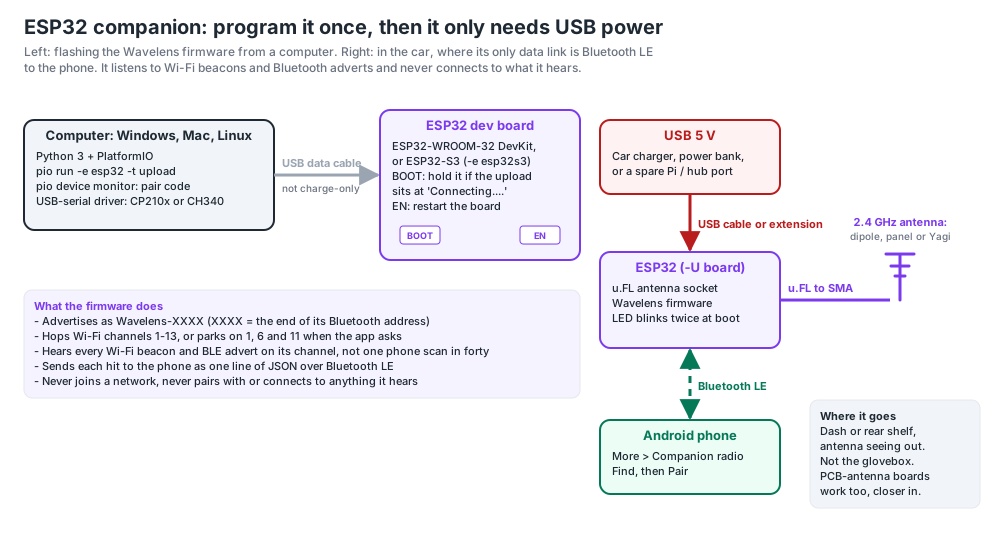
The ESP32 is a small board with its own Wi-Fi and Bluetooth radios. Flashed with the Wavelens firmware it listens to 2.4 GHz Wi-Fi beacons and Bluetooth advertisements, and sends each one to the phone as a line of JSON over Bluetooth LE. The phone treats those hits exactly like its own. The ESP32 never joins a network and never connects to anything it hears. You program it once from a computer; after that it only needs USB power.
Which board
- ESP32-WROOM-32 "DevKit": the cheap, common one. Build environment
esp32. - ESP32-S3 DevKitC: newer, works the same. Build environment
esp32s3. - ESP32-C3, C6 or C5 (C3 SuperMini, XIAO ESP32C3 / C6, C5-DevKitC-1): supported from firmware 2026.11.06. Single core, so they hear a little less than a classic ESP32; the C5 also hears 5 GHz Wi-Fi. Build environments
esp32c3,esp32c6,esp32c5. - For an external antenna get a -U module (ESP32-WROOM-32U, ESP32-S3-WROOM-1U): it has a u.FL socket. Boards with only a PCB antenna work fine closer to the windscreen.
- A USB data cable. Many cables are charge-only and the board never shows up.
Install the tools
You need Python 3 and PlatformIO, the build tool that downloads the ESP32 compiler for you.
- Windows: install Python 3 from python.org and tick Add to PATH. Then in PowerShell:
pip install platformio - Mac:
python3 -m pip install --user platformio(orbrew install platformio). - Linux:
python3 -m pip install --user platformio, then add yourself to the serial group so you can reach the board without sudo:sudo usermod -aG dialout $USERand log out and back in.
Most boards use a CP210x (Silicon Labs) or CH340/CH343 (WCH) USB-serial chip, printed on the small chip by the USB socket. Mac and Linux include both drivers; on Windows, install the one your board uses if it doesn't appear.
Get the firmware and flash it
git clone --depth 1 https://github.com/pmcbrien/wavelens.git
cd wavelens/companion/esp32/wavelens_companion
pio run -e esp32 -t upload        # other chips: -e esp32s3 / esp32c3 / esp32c6 / esp32c5
The first run downloads the toolchain and takes a few minutes; later builds take under a minute. A good upload ends with Hash of data verified and [SUCCESS].
Read its pair code
pio device monitorPress the board's EN (reset) button if nothing prints. It says advertising as 'Wavelens-3F2A' (pair code 3F2A); the code is the end of its Bluetooth address. Ctrl+C leaves the monitor; the board keeps running.
Pair it with Wavelens
- Power the board near the phone. Its LED blinks twice at boot.
- In Wavelens open More → Companion radio and tap Find.
- Tap Pair on the entry with your code. Running a Raspberry Pi as the main companion already? Use Second companion → Find → Pair as second instead.
- Blink LED flashes the board so you know you paired the right one. It reconnects by itself from then on.
In the car, Park for body cams & radios holds it on Wi-Fi channels 1, 6 and 11 with Bluetooth on; otherwise it hops channels 1 to 13. Put it where its antenna sees out: dash or rear shelf, not the glovebox.
Updating it later
cd wavelens
git pull
cd companion/esp32/wavelens_companion
pio run -e esp32 -t upload
Pairing survives an update; the phone reconnects on its own.
When the upload won't start
- "Serial port COM1" or "No serial data received": it can't see the board. Try another cable (charge-only is the usual cause), check the driver, then name the port:
pio run -e esp32 -t upload --upload-port COM5(Mac:/dev/cu.usbserial-*or/dev/cu.wchusbserial*; Linux:/dev/ttyUSB0or/dev/ttyACM0). - Stuck at "Connecting....": hold the BOOT button until writing starts, then let go.
- "Permission denied" on Linux: the
dialoutgroup step above, then log out and in. - Doesn't show in Find: another app may be holding it, or Bluetooth permission is off for Wavelens. The Not showing up? section on the Companion radio screen covers the rest, and has a pair-by-address field.
Adding a CC1101 or SX1276 for 433 MHz sensors, an SA818 for an analog scanner, or an RX5808 for 5.8 GHz video is a different build environment and a few wires: platformio.ini lists them, and the SA818 article walks through one.
Rather not build it?
Spotter $64 · Full Spectrum $499: the builds on this blog, programmed and tested, set up for where you drive, with free updates for life. The guides stay here, free, if you change your mind.
Shop Join the free Android beta
Open firmware and bridge on GitHub · receive only · every command on this blog is copied from a Pi we run